
Home / News / Bing’s Browsing‑Based Related Searches Boost Local Business Visibility
Bing’s Browsing‑Based Related Searches Boost Local Business Visibility
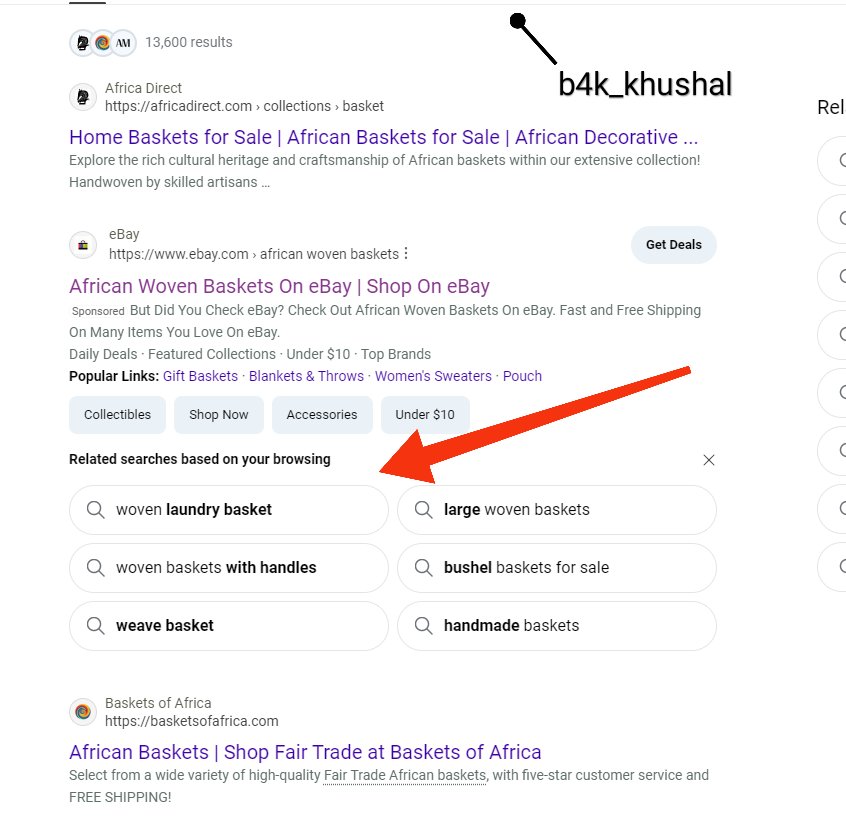
Bing is piloting a new related‑search panel that surfaces queries based on a user’s recent browsing history, positioned just below Microsoft Ads. This personalized feature could boost local business visibility in AI‑driven search results and increase traffic to local listings.
Key Highlights
- ✓Bing’s new related‑searchs panel appears below Microsoft Ads
- ✓It’s personalized to a user’s browsing history
- ✓Can boost local business visibility in AI search results
- ✓Encourages structured data for better relevance
What Happened
Bing is piloting a new related‑search panel that surfaces queries derived from a user’s recent browsing activity. The feature mirrors Google’s recent rollout, but Bing places it immediately below the Microsoft Ads section on the results page, signaling a shift toward more personalized search experiences that could reshape how local businesses appear in search results.
Key Details
- Location – The panel appears below Microsoft Ads, giving it a high‑visibility spot on the SERP.
- Personalization – Related searches are generated from the visitor’s recent browsing history, not just the current query.
- Scope – Currently in a limited test, Bing is gathering data to gauge engagement and relevance.
- Impact on Ads – The new panel sits between organic listings and paid ads, potentially affecting click‑through rates for both.
What It Means For Your Business
1. Better Discovery Through AI‑Driven Search
AI tools such as ChatGPT, Perplexity, Gemini, and Google AI rely on search engine data to build knowledge graphs. When Bing surfaces related searches tied to a user’s browsing context, it enriches the semantic data available to these tools. Local businesses that are properly cited and optimized for related queries stand a better chance of appearing in AI‑generated answers.
2. Increased Traffic to Local Listings
Because the related‑search panel is positioned near the top of the page, users are more likely to click on it. If your business’s name or service shows up in that list, you can capture traffic that otherwise would have gone to competitors or generic search results.
3. Opportunities for Structured Data
To appear in related searches, ensure your business uses structured data (Schema.org localBusiness, Product, Offer). Bing’s algorithm rewards well‑formatted, up‑to‑date information, which can translate into higher visibility in both the SERP and AI‑powered assistants.
4. Competitive Edge in Voice and AI Assistants
Voice assistants increasingly pull from Bing’s index. A strong presence in Bing’s related searches can improve the odds that your business shows up when users ask about services in your area. This is especially important as voice search and AI assistants grow.
How to Leverage This Feature
- Audit Your Citations – Make sure your business appears consistently across major directories.
- Add Rich Snippets – Implement local business schema to boost relevance.
- Track Performance – Use Bing Webmaster Tools to monitor how often your business appears in related searches.
- Optimize for Voice – Craft FAQ content that aligns with conversational queries.
By staying ahead of Bing’s evolving search experience, you can position your local business to be discovered by both human users and AI tools.
Bottom Line
Bing’s test of browsing‑based related searches signals that search engines are moving toward more contextual, personalized results. For local businesses, this means new avenues to improve visibility, attract traffic, and be cited accurately by AI assistants. The key is to maintain clean, consistent, and structured online information so that Bing’s algorithm can match your business to the right user intent.
Stay Updated
Keep an eye on Bing’s announcements and adjust your SEO strategy accordingly. The more proactive you are, the better positioned you’ll be when this feature expands to a wider audience.
Why It Matters: For businesses that rely on being discovered by AI assistants, Bing’s personalized related searches represent a new vector for visibility. AI tools ingest search data to build knowledge graphs; the more frequently your business appears in related queries, the richer the data available for these tools to surface. This translates into higher chances of being cited in AI‑generated answers, which are becoming a primary way customers find local services.
FAQs
- Will this feature be available to all Bing users soon?
Bing is currently running a limited test. The rollout timeline is unclear, but the company often expands features after gathering enough data.
- Does this affect my paid ads?
The related searches panel sits between organic results and Microsoft Ads, so it could influence click‑through rates for both. Adjusting your ad copy to align with related queries may help.
- How can I see if my business shows up in the panel?
Use Bing Webmaster Tools to monitor visibility metrics and check the related searches section manually for relevant queries.
Why This Matters For Your Business
Bing’s new related‑search panel gives local businesses a fresh opportunity to surface in AI‑driven search results. Because AI assistants pull from Bing’s index, appearing in the related‑search list can boost the likelihood that your business shows up in conversational queries, especially as voice search grows. The feature’s placement just below Microsoft Ads gives it a prominent spot, increasing the chances that users will notice and click on it. By ensuring your citations are accurate and your structured data is up‑to‑date, you can leverage this visibility to attract traffic that would otherwise go to competitors. For business owners, the takeaway is clear: optimize your local listings, enrich your schema, and monitor performance to stay ahead of this evolving search landscape.
Frequently Asked Questions
Will this feature be available to all Bing users soon?
Bing is currently running a limited test. The rollout timeline is unclear, but the company often expands features after gathering enough data.
Does this affect my paid ads?
The related searches panel sits between organic results and Microsoft Ads, so it could influence click‑through rates for both. Adjusting your ad copy to align with related queries may help.
How can I see if my business shows up in the panel?
Use Bing Webmaster Tools to monitor visibility metrics and check the related searches section manually for relevant queries.
Is your business showing up in AI search?
Get your free AI visibility audit - see if ChatGPT, Perplexity, and Google AI actually recommend you.