
Home / News / Google Ads Gets AI Video Tool: Gemini Omni Makes Video Creation a Breeze
Google Ads Gets AI Video Tool: Gemini Omni Makes Video Creation a Breeze
Google’s latest update brings Gemini Omni’s AI video creation to Google Ads, letting marketers turn briefs and brand guidelines into multi‑format videos instantly. With prompt‑based editing and brand‑consistency safeguards, the tool cuts creative production time and costs. Small businesses can now launch polished video ads directly into campaigns, boosting visibility in AI‑driven search.
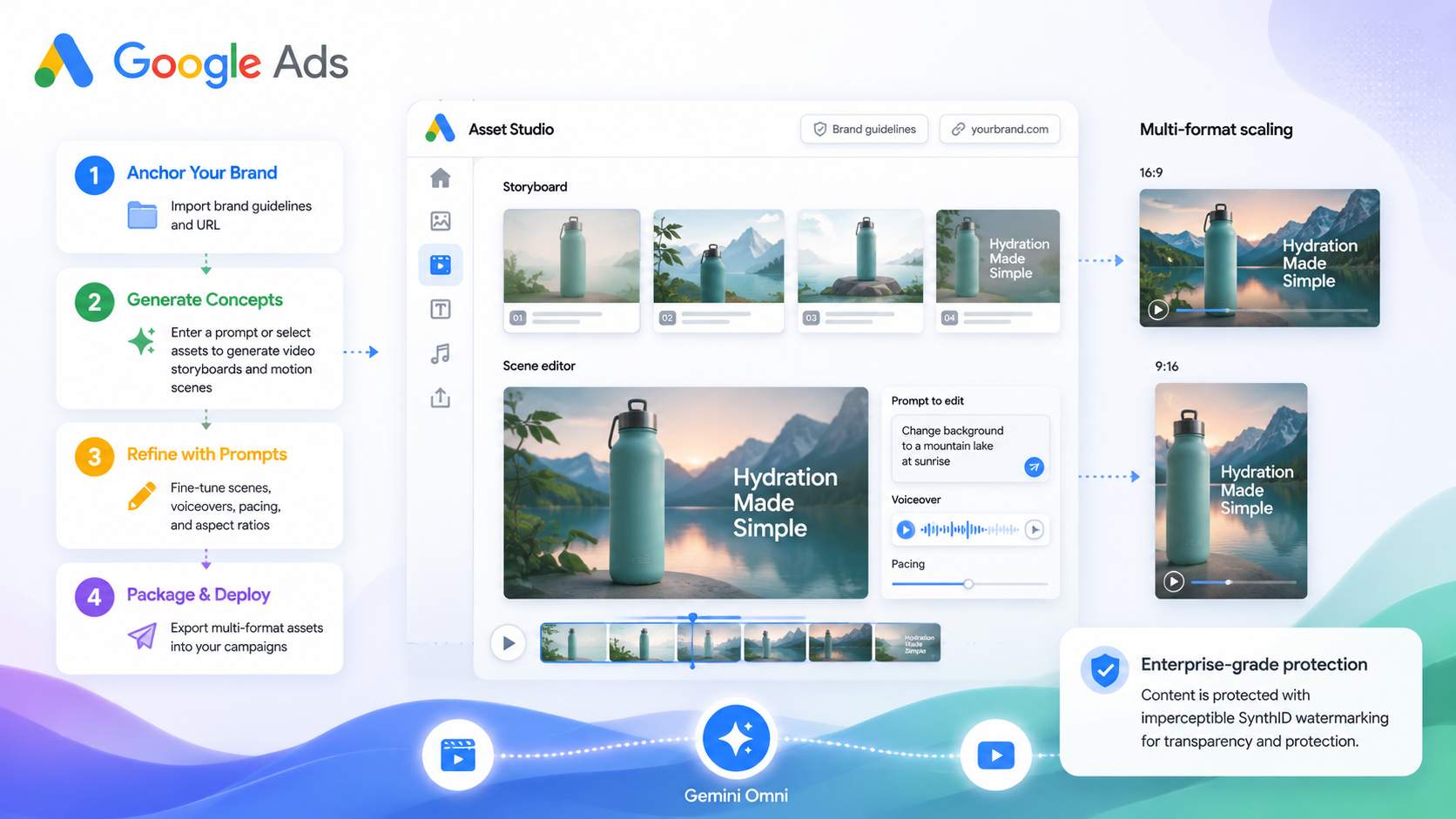
Key Highlights
- ✓Gemini Omni now in Google Ads Asset Studio for instant video creation
- ✓AI generates brand‑consistent multi‑format videos from text prompts and existing assets
- ✓Prompt‑based editing lets you tweak scenes without rebuilding from scratch
- ✓Direct export to campaigns speeds up rollout and testing
What Happened\n\nGoogle has just rolled out Gemini Omni into Asset Studio in Google Ads, giving advertisers a new AI‑driven way to turn brand guidelines, creative briefs and existing assets into fully‑editable videos. The move is part of Google’s push to streamline creative production for Demand Gen, Performance Max and YouTube campaigns.\n\n## Key Details\n\n- **Where it lives**: Asset Studio inside Google Ads.\n- **What it does**: Generates video storyboards, motion scenes, voice‑overs, and multiple aspect ratios from text prompts or static assets.\n- **Four‑stage workflow**: 1️⃣ Establish the brand, 2️⃣ Generate concepts, 3️⃣ Refine the creative, 4️⃣ Deploy the finished assets.\n- **Prompt‑based editing**: Adjust scenes, pacing, or style with natural‑language prompts without starting from scratch.\n- **Brand consistency**: The model uses reasoning to keep visuals and tone in line with supplied brand guidelines.\n- **Multi‑format output**: Produce ads for Google Search, Display, YouTube, and social‑style feeds all from one tool.\n- **Direct campaign export**: Finished videos can be uploaded straight into campaigns with no extra file transfers.\n\n## What It Means For Your Business\n\n### 1. Faster, Cheaper Creative Production\nIf you’re a local shop or a small marketing agency, time and money spent on video production are a big hurdle. Gemini Omni lets you create dozens of video variations in minutes, eliminating the need for a full‑time videographer or costly post‑production services.\n\n### 2. Consistency Across Channels\nThe AI respects the brand guidelines you upload, so every frame, font, and color palette stays true to your identity. That consistency boosts brand recognition—an essential factor when AI tools like ChatGPT or Gemini pull information from your ads to answer user queries.\n\n### 3. AI‑Ready Assets for Discovery\nWhen Google’s AI models read your video content, they pull in your brand’s voice and visuals. High‑quality, consistent videos are more likely to be surfaced in AI‑generated answers, boosting your visibility in conversational search and recommendation engines.\n\n### 4. One‑Click Deployment\nBecause the videos are exported directly to Google Ads, you can launch new creatives instantly. That means you can test, iterate, and scale campaigns faster than competitors still juggling separate creative pipelines.\n\n### 5. Competitive Edge in Local Search\nLocal businesses often compete on trust and relevance. By using Gemini Omni to produce compelling, brand‑consistent videos, you give AI systems more signals to associate your business with relevant local queries—helping you appear in the coveted “Local Pack” and on Google Maps.\n\nIn short, Gemini Omni is not just a tech buzzword; it’s a practical tool that can shave weeks off your creative cycle, lower costs, and give you a sharper edge in AI‑driven discovery.\n\n## How to Get Started\n\n1. Log into Google Ads and open Asset Studio.\n2. Upload your brand guidelines and website URL.\n3. Enter a creative brief or drag in existing images.\n4. Let Gemini Omni generate storyboard options.\n5. Refine with prompts—add voice‑over text, change background, adjust pacing.\n6. Export the final video directly into your desired campaign.\n\nIf you’re new to AI tools, start with a simple product promo and watch how quickly the AI turns it into a polished video. From there, experiment with different angles, call‑to‑action placements, and even localized subtitles.\n\n## Final Thoughts\n\nGoogle’s Gemini Omni integration signals a broader trend: AI is becoming the default creative engine for marketers. For local and small businesses, the takeaway is clear—embrace AI to create, refine, and distribute video content at scale. The result? More visibility, higher engagement, and a stronger presence wherever AI is pulling answers for your customers.\n\n---\n\n*Prepared by VisibilityAI – helping local businesses get discovered by AI tools.*
Why This Matters For Your Business
For businesses that rely on being found by AI‑powered assistants, having fresh, brand‑consistent video content is a game‑changer. AI search engines and chatbots pull context from your ads to answer user questions, so the more polished and on‑brand your visuals are, the higher the chance your business will be cited as a reliable source.\n\nMoreover, Gemini Omni slashes the time and cost of producing video assets. Small businesses can now compete with larger brands that have dedicated creative teams, ensuring that your local listings, Google Maps profile, and social feeds all feature high‑quality, AI‑friendly media. This not only improves click‑through rates but also signals relevance to AI models, boosting your overall discoverability across multiple platforms.
Frequently Asked Questions
How does Gemini Omni help my local business get discovered by AI search engines?
Gemini Omni creates brand‑consistent videos that AI models can read and use as authoritative content, increasing the chances your business appears in AI‑generated answers and local listings.
Do I need a technical background to use Gemini Omni?
No. The tool uses natural‑language prompts and a simple interface in Asset Studio, so marketers can generate and refine videos without coding or design expertise.
Will the videos I create be used by Google’s AI models to answer customer queries?
Yes. Once you upload videos to Google Ads, Google’s AI systems can analyze the visuals, audio, and text, using them to power answers in search, chat, and other AI‑driven experiences.
Is your business showing up in AI search?
Get your free AI visibility audit - see if ChatGPT, Perplexity, and Google AI actually recommend you.