
Home / News / Google Ads PMax Update: Choosing the Right Destination After a Click
Google Ads PMax Update: Choosing the Right Destination After a Click
Google Ads Performance Max now lets advertisers choose whether clicks land on your website or a Google‑hosted page built from your Google Business Profile. This change can boost local visibility, simplify tracking, and make your business more discoverable by AI assistants. Learn how to pick the right option and optimize for better ROI.
Key Highlights
- ✓New destination choice in PMax: website vs. GBP page
- ✓Built‑in conversion tracking for phone calls, directions, and website visits
- ✓GBP pages enhance local search visibility and AI discovery
- ✓Ideal for small businesses to reduce landing‑page maintenance
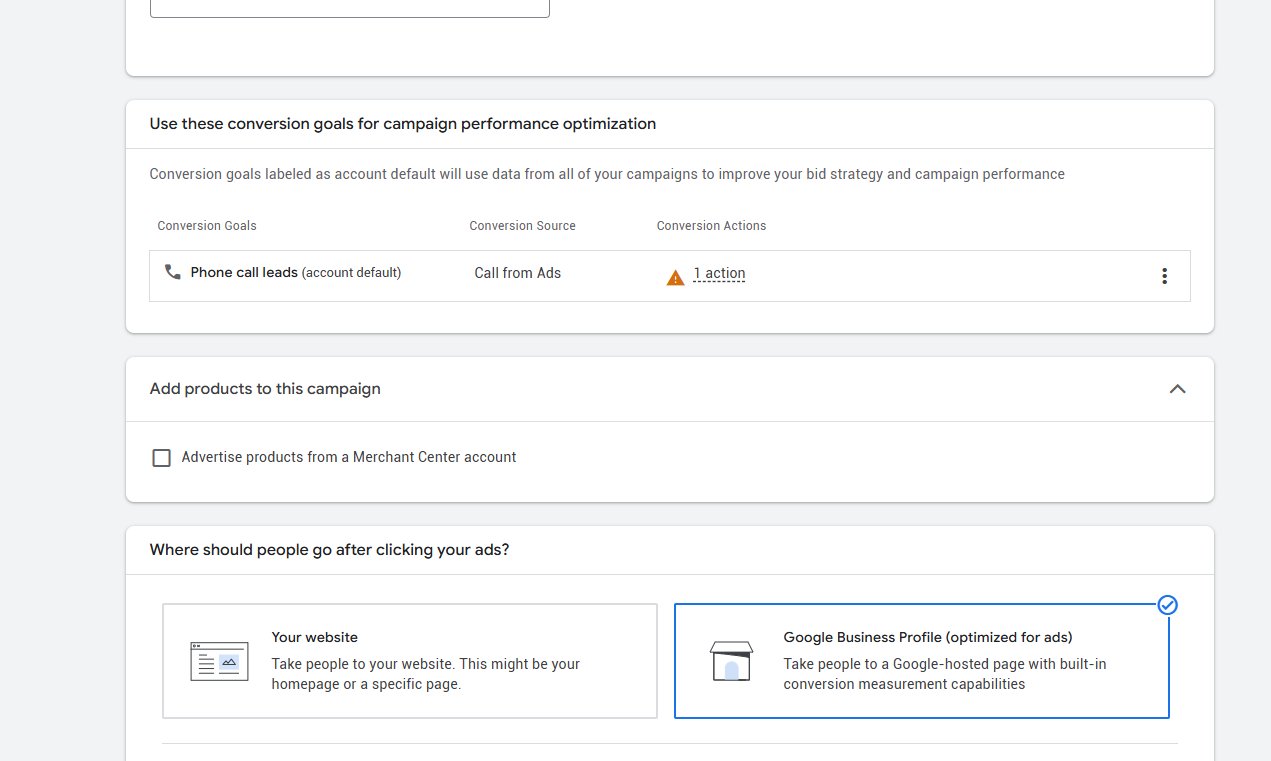
What Happened\n\nGoogle Ads recently introduced a new setting in Performance Max (PMax) campaigns: **“Where should people go after clicking your ads?”** The option gives advertisers a choice between sending traffic to their own website or to a **Google‑hosted page** built from their Google Business Profile (GBP). The change was first spotted by industry analyst Natasha Kaurra on X and LinkedIn and has quickly become a hot topic among local marketers.\n\n## Key Details\n\n- **Two Destination Options**\n 1. **Your website** – The classic route. You can direct users to your homepage, a product page, a booking form, or any URL you choose.\n 2. **Google Business Profile (optimized for ads)** – Google generates a landing‑page that pulls data from your GBP (hours, address, photos, reviews). The page includes built‑in conversion tracking and a “Call”, “Website”, or “Get Directions” button.\n\n- **Conversion Tracking**\n - Website clicks use standard Google Analytics or the Global Site Tag.\n - GBP landing pages automatically report “Call”, “Direction”, and “Website” actions back to Google Ads, giving you richer attribution data.\n\n- **Impact on Local SEO**\n - The GBP option can boost your business’s visibility in local search results because the page is hosted on Google’s domain and indexed as a “Google My Business” listing.\n - It also feeds back into your GBP’s performance metrics (e.g., click‑through rates, phone calls), which can influence your local ranking.\n\n- **AI Discovery Considerations**\n - AI tools like ChatGPT and Gemini pull data from Google’s index. A well‑optimized GBP landing page can increase the amount of structured data available for AI to surface your business in conversational searches.\n\n## What It Means For Your Business\n\n### 1. Choose the Right Destination for Your Goals\n\n- **If you need to capture leads or sales on your site** (e.g., e‑commerce checkout, appointment booking), keep the destination as your website. You’ll have full control over the user journey and conversion funnel.\n- **If you want to drive phone calls or store visits**, the GBP option is powerful. The “Call” button can be triggered directly from the ad, and the page’s built‑in tracking gives you a clear picture of how many people are taking that action.\n\n### 2. Leverage Structured Data for AI Visibility\n\n- A GBP landing page automatically includes schema markup (LocalBusiness, Address, Phone, etc.). AI assistants that parse structured data can pull this information to answer user queries, improving your chances of appearing in “People also ask” or “Featured Snippet” sections.\n\n### 3. Simplify Campaign Management\n\n- Using the GBP page reduces the need to create and maintain a dedicated landing page on your site. For small businesses with limited resources, this can be a significant time saver.\n- However, if you’re running a multi‑channel strategy, consider keeping both options in separate ad groups to test which delivers better ROAS.\n\n### 4. Monitor and Optimize\n\n- Run A/B tests: create two PMax campaigns, one pointing to your website and the other to the GBP page. Compare cost per acquisition, conversion rate, and overall ROAS.\n- Pay attention to the “Call” and “Direction” metrics in the GBP campaign. High numbers can indicate strong local demand but may also signal that users are not finding the information they need on your website.\n\n### 5. Future‑Proof Your Local Presence\n\n- Google’s emphasis on GBP shows that the platform is positioning itself as the primary hub for local discovery. By integrating your ads with GBP, you’re aligning with this shift and ensuring that AI tools can easily surface your business.\n\n### 5. Best Practices Checklist\n\n- **Keep Your GBP Updated** – Ensure hours, services, photos, and reviews are current. AI tools often surface the most recent information.\n- **Use High‑Quality Images** – Visuals on the GBP page improve click‑through and conversion rates.\n- **Add a Clear Call‑to‑Action** – Whether it’s “Book Now” or “Call Us”, a concise CTA on the GBP page can drive immediate action.\n- **Track Both Channels** – Use UTM parameters for website traffic and monitor GBP metrics in Google Ads to get a holistic view.\n
Why This Matters For Your Business
For businesses that want to be found by AI assistants, the structure and visibility of your online presence matter more than ever. Google’s new PMax destination option gives you a direct path to a Google‑hosted page that is already optimized for local discovery and enriched with structured data. AI tools such as ChatGPT, Gemini, and Google’s own conversational agents rely on this structured data to answer user queries in real time. If your business is listed on a well‑optimized Google Business Profile page, it’s far more likely to appear in those AI‑driven responses, giving you a competitive edge over rivals that rely solely on a traditional website.\n\nMoreover, local SEO is increasingly tied to engagement signals that Google can track on its own domain. A GBP landing page can capture phone calls, direction requests, and website visits directly within the Google ecosystem, providing richer attribution data. This means you can measure the true impact of your ads on local foot traffic or phone inquiries without having to rely on third‑party tracking solutions. For small businesses, the ability to drive calls or store visits through a simple click can translate into immediate revenue and a stronger local reputation.\n
Frequently Asked Questions
How do I set the destination in PMax?
In Google Ads, edit the campaign, go to Settings > Destination, and choose either "Website" or "Google Business Profile (optimized for ads)".
Will using a GBP page reduce my website traffic?
Not necessarily; it can complement your site by driving calls or directions, but you can still use both in separate campaigns.
Does the GBP page affect my local ranking?
Yes, because it adds more structured data and engagement signals that Google uses in local ranking.
Is your business showing up in AI search?
Get your free AI visibility audit - see if ChatGPT, Perplexity, and Google AI actually recommend you.