
Home / News / Google Ads Revamps Billing Menu, Doubling Links for Easier Management
Google Ads Revamps Billing Menu, Doubling Links for Easier Management
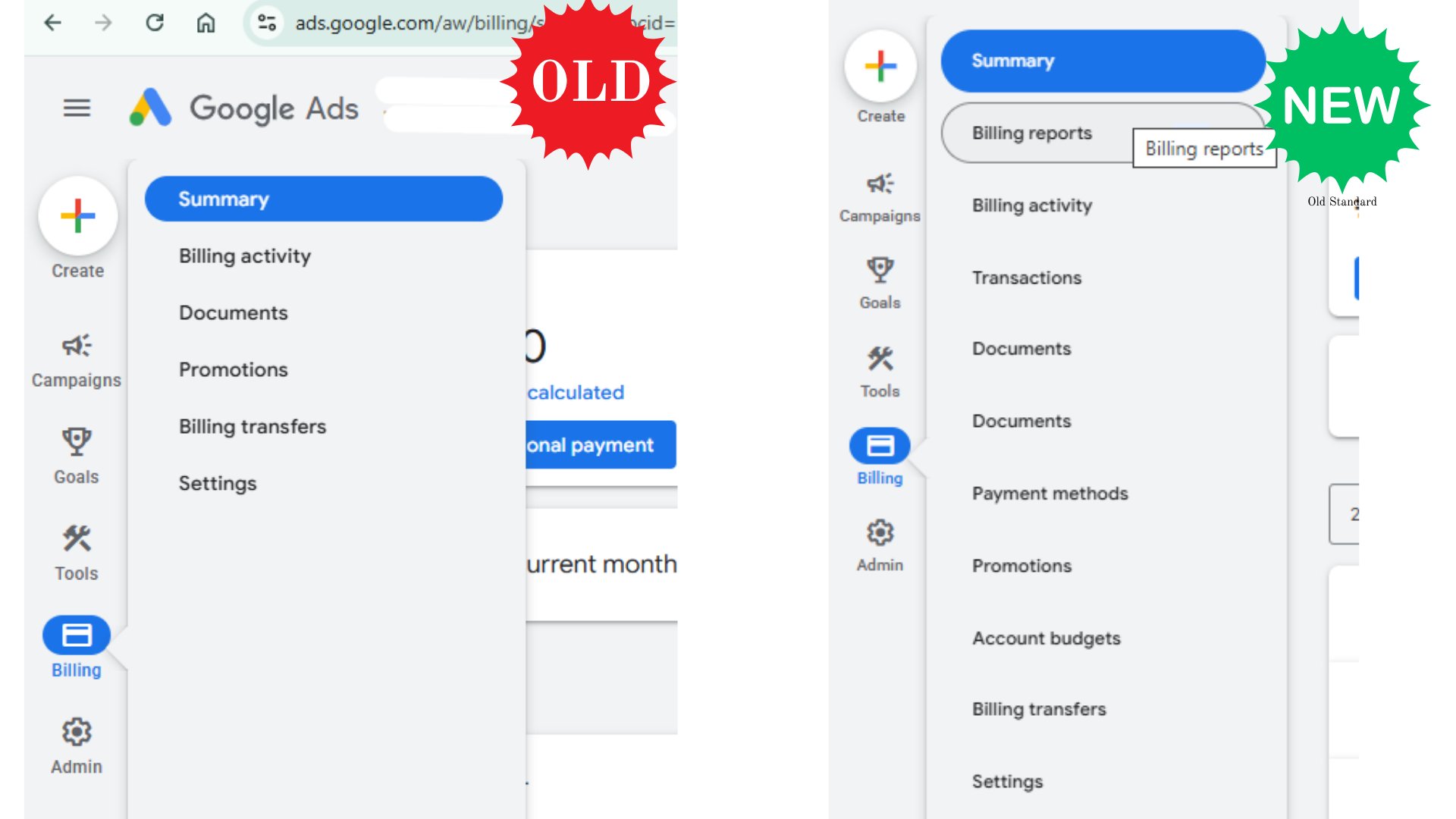
Google Ads is testing a new billing menu bar that doubles the number of links, giving local businesses quicker access to payment and invoice information. The update, still in pilot, aims to streamline billing navigation and support AI‑driven search visibility.
Key Highlights
- ✓Google Ads doubles billing links for easier navigation
- ✓New menu bar includes 10+ links like Billing History, Invoices, Tax Info
- ✓Update improves AI search visibility by keeping payment data current
- ✓Business owners can save time and reduce support tickets with streamlined billing
What Happened
Google Ads has rolled out a fresh update to its billing interface, adding a new menu bar that effectively doubles the number of links available to advertisers.
The change is part of a broader effort to streamline account management, making it easier for small‑to‑medium businesses to navigate billing, invoicing, and payment settings.
Key Details
- New Menu Bar: A horizontal tab appears above the billing dashboard, featuring additional links such as Billing History, Payment Methods, Invoices, Billing Settings, Tax Information, Account Balance, Payment Schedule, Billing Reports, Subscription Management, and Support.
- User Testing Phase: The update is currently in a limited‑test mode. Advertisers can opt‑in via the Ads Help Center to try out the new layout.
- Visual Design: The new bar uses a lighter color palette and clearer typography, reducing visual clutter.
- Accessibility: Google claims the redesign meets WCAG 2.1 AA standards, improving navigation for users with disabilities.
- Data Sync: All billing data remains synced with the core Ads account, so there are no new API endpoints or changes to existing reporting tools.
How to Enable the New Menu
If you’re curious about the new billing bar, you can activate it by following these steps:
1. Sign in to your Google Ads account.
2. Click the Help icon (question mark) in the upper right corner.
3. Search for billing menu update and select the article titled "Google Ads Billing Menu Update – Test Your Experience.".
4. Toggle the switch to On and reload the page.
Once enabled, the bar will appear across all billing pages until you turn it off.
Potential Challenges
While the new UI is largely positive, some users have reported:
- Confusion Over Duplicate Links: The extra links can feel redundant for seasoned advertisers.
- Browser Compatibility: A few users on older browsers experience flickering of the new tab.
- Learning Curve: Small teams may need a brief refresher session to get comfortable with the expanded menu.
Google’s support team is monitoring feedback and plans to roll back or tweak the layout if necessary.
What It Means For Your Business
- Faster Access to Critical Data: With more links visible at a glance, you can check your account balance, download invoices, or update payment methods without digging through multiple menus. This speed translates directly into less time spent on admin tasks.
- Improved Visibility for AI‑Driven Search: AI assistants like ChatGPT and Gemini rely on up‑to‑date business information. A smoother billing experience encourages you to keep payment details current, reducing the risk of ad disapprovals that can hurt your AI visibility.
- Better Reporting for Citation Accuracy: The new Billing Reports link gives you granular insights into spend by campaign and by date. When you feed this data into tools that verify local citations, your business’s online presence becomes more consistent across search engines.
- Lower Support Overhead: The integrated Support link offers quick access to troubleshooting guides and live chat. Fewer billing mishaps mean fewer support tickets, freeing up your marketing team to focus on growth.
- Opportunity for Automation: Even though the UI has changed, the underlying API remains the same. Businesses that already automate billing updates via scripts or third‑party tools will see no disruption, but the new UI may inspire fresh automation ideas—such as automatically flagging when the balance drops below a threshold.
Bottom Line
For most local businesses, the new billing menu is a convenience win. It saves time, reduces friction, and supports the goal of keeping your business data accurate—an essential factor for AI search engines that rely on up‑to‑date information to surface local listings.
Why It Matters
Accurate billing data is the backbone of reliable ad delivery. When your payment information is up‑to‑date, Google Ads can run campaigns without interruption, ensuring your ads appear in the right places at the right times. For local businesses, this consistency directly affects the visibility of your listings in AI‑powered search assistants that pull from Google’s data feeds.
AI assistants such as ChatGPT, Gemini, and Google AI rely heavily on structured, verified business information to answer user queries. A streamlined billing interface reduces the chances of ad disapprovals or account suspensions, keeping your business data intact. When your ads run smoothly, the data that feeds into these AI tools remains accurate, improving the likelihood that your business will be cited correctly in AI responses.
Beyond ad delivery, the new menu saves you valuable time. By cutting navigation steps, you can focus more on optimizing local citations, updating NAP (Name, Address, Phone) details, and engaging with customer reviews—critical factors that AI algorithms weigh when ranking local businesses. The result is a stronger, more consistent online presence that AI search engines trust and amplify.
Why This Matters For Your Business
Accurate billing data keeps campaigns running smoothly, which in turn ensures that your business information stays current in the feeds that AI assistants use. When payment details are up‑to‑date, Google Ads can serve ads without interruption, boosting your visibility in search results and reducing the risk of account suspension. For local businesses, a reliable billing interface also frees up time to refine NAP details, manage reviews, and strengthen citations—factors that AI algorithms prioritize when determining local relevance. A streamlined billing experience also means fewer support tickets, allowing your team to focus on growth initiatives rather than troubleshooting. In an ecosystem where AI tools increasingly power consumer queries, keeping your billing data accurate and easily accessible is a small but critical step toward maintaining a trustworthy, high‑ranking local presence.
Frequently Asked Questions
Is this update mandatory for all Google Ads users?
No, it’s currently in testing mode. Users can opt‑in via the Help Center. Once fully rolled out, it will be available to all accounts.
Will the new menu affect my existing billing reports?
No. The underlying data and API endpoints remain unchanged. Reports will continue to function as before.
How does this help my business get discovered by AI tools?
By ensuring billing information is up‑to‑date and easily accessible, you reduce the risk of ad disapprovals and maintain a consistent online presence, which AI assistants use to verify and cite local businesses.
Is your business showing up in AI search?
Get your free AI visibility audit - see if ChatGPT, Perplexity, and Google AI actually recommend you.