
Home / News / Google Ads Sourced Videos Toggle: Boost AI Discovery
Google Ads Sourced Videos Toggle: Boost AI Discovery
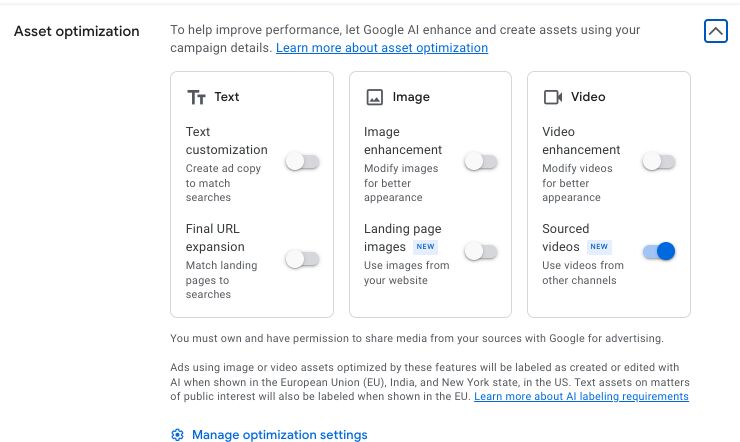
Google Ads now offers a **Sourced Videos** toggle that lets its AI automatically pull relevant clips from your approved video library into campaigns. This streamlines asset management, boosts ad relevance, and helps local businesses surface in AI‑generated search answers.
Key Highlights
- ✓New on/off toggle for AI‑selected videos in Google Ads
- ✓Automatic video selection from approved sources
- ✓Instantly boosts relevance in AI‑driven search answers
- ✓Saves time for small business marketers
What Happened
Google Ads has introduced a Sourced Videos on/off toggle in the Asset Optimization section. When activated, the platform’s AI scans the video assets you’ve approved—whether on YouTube, Google Drive, or elsewhere—and automatically inserts the most pertinent clips into your campaigns. The toggle gives advertisers a ready‑made pool of videos without the need for manual uploads or edits.
Key Details
- Toggle Location: Found under the Asset Optimization tab in the Google Ads UI.
- AI‑Powered Selection: The system matches your video library against the campaign’s target keywords and audience data.
- Automatic Updates: Adding a new video to your approved list prompts the AI to re‑evaluate and potentially place it in active campaigns.
- Granular Control: Enable the feature for individual ad groups or entire campaigns, or keep it off for full manual curation.
- Compliance & Privacy: Only videos you have explicitly approved are considered, preserving brand consistency and legal compliance.
What It Means For Your Business
Boost Visibility in AI‑Driven Search
AI assistants such as ChatGPT, Gemini, and Google AI draw from the same video repositories advertisers use. By automatically surfacing fresh, relevant video content, the toggle increases the likelihood that your brand appears in AI‑generated answers, aligning the visual assets with user intent.
Save Time and Resources
Selecting and uploading videos for every campaign can strain small marketing teams. The toggle removes that bottleneck, allowing you to focus on strategy, copy, and targeting instead of asset logistics.
Improve Engagement Metrics
When videos align closely with campaign themes and audience interests, click‑through rates tend to rise. Letting Google’s AI handle the matching can translate into higher ROI on your ad spend.
Stay Ahead of Competitors
Many local businesses still rely on text‑only ads or generic stock footage. This feature gives you an edge by automatically injecting brand‑specific videos that resonate with local audiences and are discoverable by AI assistants.
Align With VisibilityAI Goals
VisibilityAI’s mission is to ensure local and small businesses are cited by AI tools. The Sourced Videos toggle directly supports that goal by simplifying the path to AI‑driven visibility across multiple platforms.
---
Take Action
1. Log in to Google Ads and navigate to Asset Optimization.
2. Switch the Sourced Videos toggle ON for the desired campaign or ad group.
3. Confirm that every video you want to use is approved and up‑to‑date.
4. Track performance metrics and fine‑tune settings as needed.
Why It Matters
For businesses aiming to be discovered by AI assistants, having video assets that the platform can automatically match to user intent is a game‑changer. AI tools rely on rich media to craft richer answers, and the more relevant the content, the higher the chance your brand surfaces in those answers.
The feature also eases the manual workload that often overwhelms small marketing teams. Instead of hunting for the perfect clip, you let Google AI do the heavy lifting, freeing up time to refine copy, improve targeting, or develop new offers.
Ultimately, the Sourced Videos toggle helps local businesses keep pace with larger competitors that already employ sophisticated AI‑driven advertising. Leveraging this tool can lift click‑through rates, boost brand recall, and ensure your business is cited in AI‑generated search results.
Why This Matters For Your Business
For businesses that want to appear in AI‑driven search results, video assets that align with user intent are increasingly important. AI assistants pull from the same repositories advertisers use, so automatically adding the right clips can make the difference between being featured or overlooked. The toggle also reduces the operational overhead that small teams face. By delegating video selection to Google’s AI, marketers can redirect their energy toward strategy, copywriting, and audience segmentation—areas that directly impact ROI. In a competitive landscape where many local firms still rely on text‑only ads or generic footage, the ability to instantly integrate brand‑specific videos gives you a distinct advantage. It not only improves engagement metrics but also reinforces the brand’s presence across emerging AI platforms.
Frequently Asked Questions
What is the Sourced Videos toggle?
It’s a setting that enables Google Ads to automatically pull relevant videos from your approved library into campaigns.
How do I enable it?
Navigate to Asset Optimization in the Google Ads UI and turn the toggle on for the campaign or ad group you want.
Does it affect my existing videos?
It only adds new or approved videos; existing ones stay unchanged unless you edit them manually.
Is your business showing up in AI search?
Get your free AI visibility audit - see if ChatGPT, Perplexity, and Google AI actually recommend you.