
Home / News / Google Ads Tests Apple Messages Button: What It Means for Small Businesses
Google Ads Tests Apple Messages Button: What It Means for Small Businesses
Google Ads is beta‑testing an Apple Messages button that lets users start a chat with a business directly from a sponsored result. For local merchants, the extension offers a fast, mobile‑first way to capture leads as AI‑driven search results increasingly favor conversational signals.
Key Highlights
- ✓Google Ads now tests a bright green Apple Messages button on search ads.
- ✓The button opens Apple’s Messages app with a pre‑filled inquiry text.
- ✓Feature is in beta; not yet available to all advertisers.
- ✓Provides a new, instant contact channel that can boost local visibility and AI search relevance.
# Google Ads Tests Apple Messages Button: What It Means for Small Businesses
What Happened
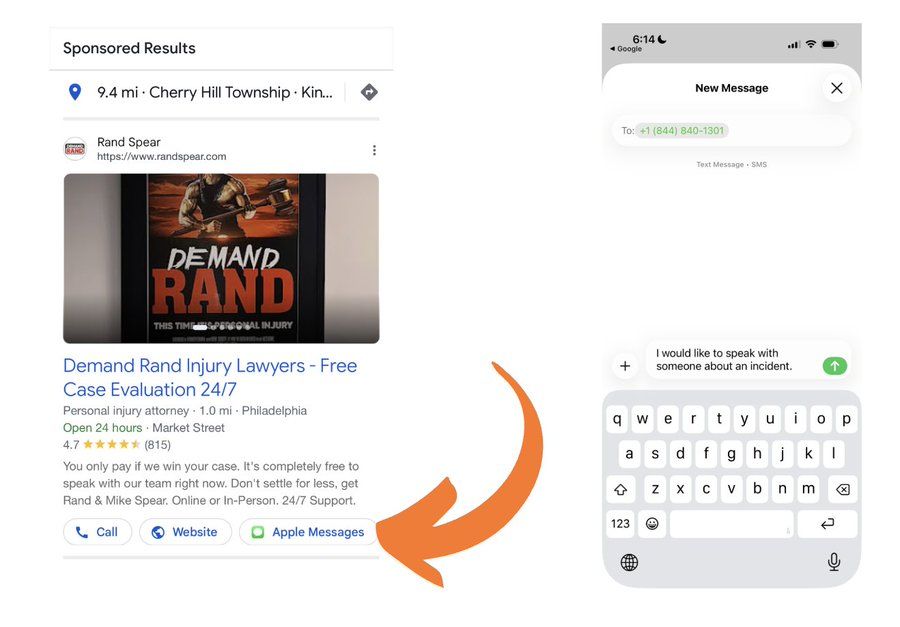
Google announced a new Apple Messages button in the Google Ads interface. While Google has long supported messaging extensions that let users click a “Message” link and chat with a business, this version works differently. The button appears as a bright‑green icon; when a user taps it, the native iMessage app opens with a pre‑filled text such as “I would like to speak with someone about an incident.”
The extension was first spotted by SEO specialist Anthony Higman on X, where he shared a screenshot of the preview pane showing the button, even though it was not yet active in his own account. According to his post, the Apple Messages option is part of a broader beta that also includes other messaging platforms.
Key Details
- Platform: Apple Messages (iMessage) integration with Google Ads.
- Visibility: The icon shows up in the Google Ads preview pane but is not universally enabled.
- Functionality: Tapping the icon launches the Messages app with a pre‑populated prompt, for example, “I would like to speak with someone about an incident.”
- Beta Status: The feature is in a secret beta; most advertisers cannot access it yet.
- Not Apple Business Messages: This is separate from Apple’s Business Messages service for enterprises.
- Potential Reach: Targets iOS users who prefer in‑app messaging over phone calls or email.
- Data Capture: Conversations are logged in the Google Ads dashboard, giving advertisers insight into user intent and interaction quality.
What It Means For Your Business
1. New Lead‑Gen Channel
- Instant Interaction: Prospects can reach you without leaving Google Search or the iPhone, cutting friction.
- Higher Conversion Rates: Messaging often outperforms phone calls for quick questions or appointment bookings.
- 24/7 Availability: Automated replies let you field inquiries outside regular business hours.
2. Boost Visibility in AI‑Powered Searches
- Rich Snippets: Google’s AI models (ChatGPT, Gemini, Perplexity) draw from structured data; a messaging link can appear in those snippets, giving your listing a conversational edge.
- Local SEO Impact: The local pack increasingly favors businesses that provide direct contact options, so a messaging button signals relevance.
3. Data‑Driven Optimization
- Conversation Analytics: See which keywords trigger messages, then refine ad copy and bids accordingly.
- A/B Testing: Compare call‑only extensions with Apple Messages to measure ROI.
- Customer Insights: Identify common questions or pain points, informing product tweaks or FAQ updates.
4. Competitive Differentiation
- Stand Out: While many rivals still rely on phone numbers, offering instant messaging positions your brand as tech‑savvy and customer‑centric.
- First‑Mover Advantage: Early adopters can capture a slice of the iOS audience before the feature becomes mainstream.
Implementation Tips for Small Businesses
1. Check Eligibility – Confirm whether your Google Ads account can enable the Apple Messages extension. If not, request beta access or wait for a wider rollout.
2. Craft a Friendly Prompt – Write a concise, welcoming pre‑filled message that invites conversation without sounding robotic.
3. Integrate with Your CRM – Route incoming messages into your customer‑relationship system so you can follow up efficiently.
4. Train Your Team – Equip staff to handle quick queries and turn them into appointments or sales.
5. Monitor Performance – Use Google Ads reports to track click‑through rates, conversation volume, and conversion metrics.
By adopting this extension, local shops—from cafés to auto‑repair garages—can tap into a growing expectation for instant, conversational interaction. As AI search tools become more dialogue‑focused, a direct messaging channel helps your business appear in those AI‑generated answers, driving discovery and citations.
Conclusion
Google’s test of the Apple Messages button points to a more interactive, mobile‑first future for paid search. Small businesses that integrate the feature early stand to capture higher‑intent traffic, boost engagement, and stay ahead of competitors in an AI‑driven search landscape.
---
For more insights on local SEO, AI search trends, and how to get discovered by ChatGPT and other AI tools, visit VisibilityAI.
Why This Matters For Your Business
The rise of conversational AI—ChatGPT, Gemini, Perplexity—means search results are shifting from static links to real‑time, intent‑driven answers. When a user asks a question, the AI often pulls from businesses that can provide a quick, conversational response. By adding an Apple Messages button, a local merchant supplies exactly that: a ready‑made channel for a short, text‑based exchange that AI can reference. For businesses that depend on being found and cited by AI tools, the messaging logs become a fresh data source. When AI systems crawl recent conversations, a brand that actively engages through iMessage is more likely to surface in snippets or recommendations, translating into additional traffic and citations. In short, the extension is more than a convenience—it’s a lever to strengthen a business’s presence in the next generation of search results.
Frequently Asked Questions
Is the Apple Messages button available to all Google Ads accounts?
No. It is currently in a secret beta, so advertisers must request access or wait for a broader rollout.
How does Apple Messages differ from Google’s standard Message extension?
Apple Messages opens the native iOS Messages app with a pre‑filled text, whereas Google’s standard extension typically uses Google Messages or a web‑based chat interface.
Can I track conversations from the Apple Messages button in Google Ads?
Yes. Messages are logged in the Google Ads dashboard, allowing you to view click‑throughs, conversation volume, and conversion data.
Is your business showing up in AI search?
Get your free AI visibility audit - see if ChatGPT, Perplexity, and Google AI actually recommend you.