
Home / News / Google AI Overviews: Why Typos Trigger AI Answers
Google AI Overviews: Why Typos Trigger AI Answers
Google’s new AI Overviews appear when a query can’t be matched or looks like a typo, offering instant answers instead of a blank results page. For local businesses, this means their visibility can be bypassed if pages aren’t indexed, but by optimizing intent‑driven content and structured data, they can still surface in AI‑powered tools like ChatGPT and Gemini.
Key Highlights
- ✓Google AI Overviews now handle typos & no-result queries
- ✓AI delivers instant answers even when no page matches
- ✓Local businesses risk missing out if not indexed
- ✓Optimizing for AI intent can boost discovery
What Happened
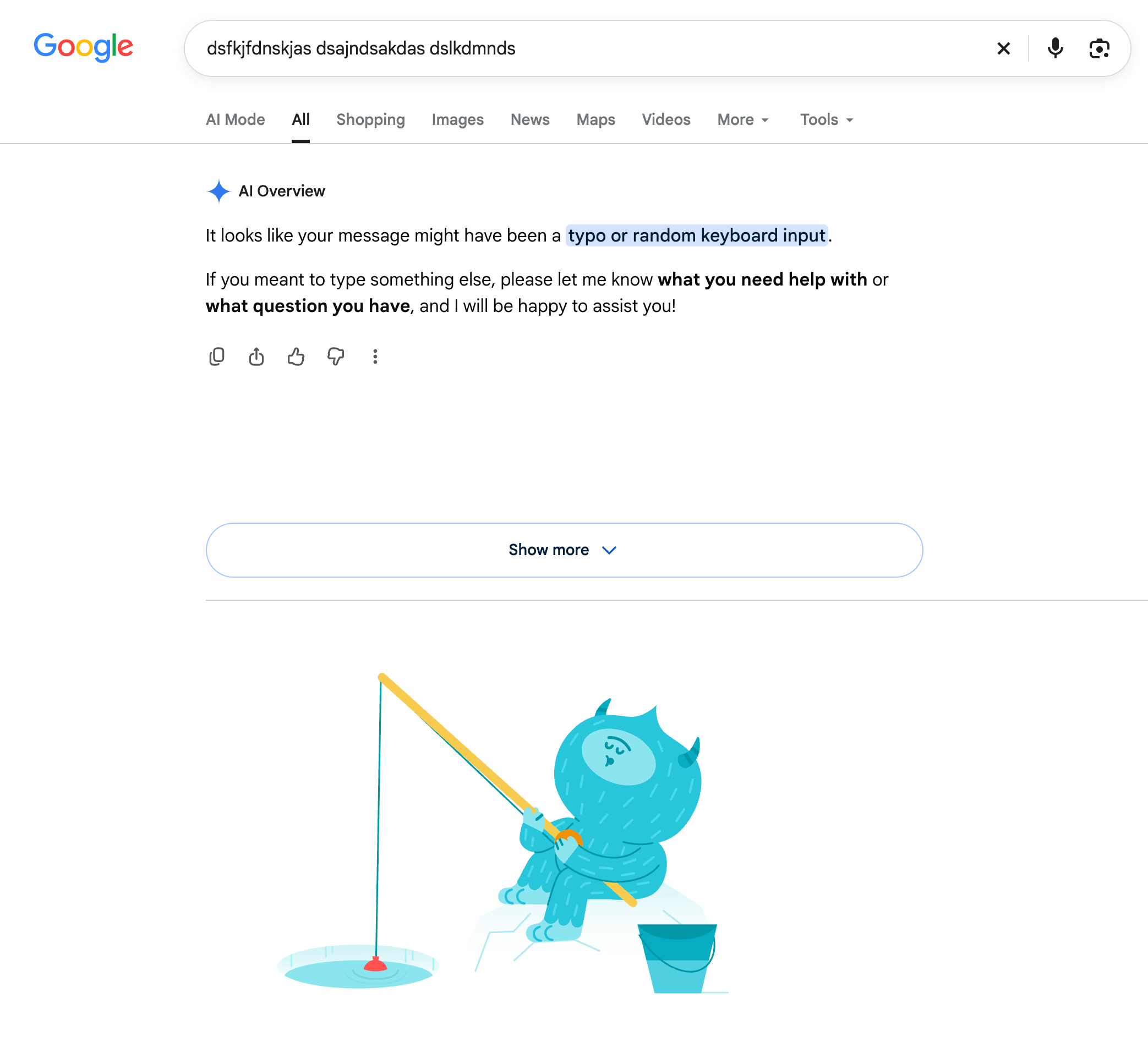
In October 2026, Google rolled out an AI‑driven feature that automatically produces an AI Overview whenever it fails to locate a matching page or flags a query as a potential typo. The interface displays a gentle prompt: “It looks like your message might have been a typo or random keyboard input.” This move fits into Google’s larger goal of keeping users engaged by delivering instant answers, even when a conventional search result is unavailable.
Key Details
- Trigger conditions: The AI Overview activates when Google cannot find a page that matches the query or flags the input as a likely typo.
- Response style: A conversational box that prompts users for clarification or supplies a brief answer.
- Coverage: It shows on desktop, mobile, and the Google app.
- Scope: The feature handles generic terms, niche keywords, and even invented phrases.
- Integration: The AI box sits above the standard search results but does not replace the SERP.
What It Means For Your Business
- Visibility gap: If your local business pages aren’t indexed or are buried deep in the SERP, the AI Overview can bypass them entirely, offering a generic response instead.
- Opportunity: By tailoring content to the intent behind the AI prompt—providing clear, concise answers to common questions—businesses can capture users who would otherwise see an empty screen.
- Citations & AI tools: ChatGPT, Perplexity, Gemini, and Google AI tap into the same index that powers these overviews. Accurate, up‑to‑date citations become even more critical.
- Action steps:
* Confirm that your Google Business Profile is complete and current.
* Add a FAQ section on your site that mirrors the language users might type.
* Employ schema markup (FAQPage, LocalBusiness) to signal search engines about your content.
* Use Google Search Console to spot "no results" errors and repair any broken links.
By staying proactive, you can transform the AI Overview from a blind spot into a powerful discovery tool.
Why It Matters
Google’s AI Overviews signal a shift from simple keyword matching to intent‑driven answers. When a user types a misspelled term or a niche query that doesn’t match any existing page, the AI box steps in, delivering a generic response instead of a blank results page. For local businesses, this means that an unindexed or poorly optimized web presence can be bypassed entirely, making it harder for customers to find you through AI‑powered tools like ChatGPT or Gemini.
To maintain visibility, businesses must treat AI Overviews as an additional SERP slot. By adding clear, concise answers to frequently asked questions, using structured data (FAQPage, LocalBusiness schema), and keeping your Google Business Profile up‑to‑date, you signal to Google that your content is authoritative. When the AI prompt appears, it can surface your business directly, giving you a competitive edge in the expanding world of AI search.
FAQs
- What exactly are Google AI Overviews?
They are AI‑generated answer boxes that appear when Google can’t find a matching page or suspects a typo, providing a brief, conversational response.
- How does this affect my local business visibility?
If your site isn’t properly indexed or optimized, the AI Overview may replace your content with a generic answer, so customers may not see your business in the results.
- What steps can I take to ensure my business appears in AI Overviews?
Make sure your Google Business Profile is complete, add an FAQ section with keyword‑rich answers, implement schema markup, and monitor Search Console for no‑results issues.
Why This Matters For Your Business
Google’s AI Overviews represent a pivot from keyword matching to intent‑driven answers. When a user types a misspelled term or a niche query that doesn’t match any existing page, the AI box supplies a generic response instead of a blank results page, ensuring the user stays engaged. For local businesses, the implication is clear: an unindexed or poorly optimized web presence can be bypassed entirely, making it harder for customers to find you through AI‑powered tools such as ChatGPT or Gemini. By treating AI Overviews as another SERP slot—adding concise FAQ answers, structured data, and an up‑to‑date Google Business Profile—businesses can signal authority and increase the likelihood that the AI prompt surfaces their brand directly.
Frequently Asked Questions
What exactly are Google AI Overviews?
They are AI‑generated answer boxes that appear when Google can’t find a matching page or suspects a typo, providing a brief, conversational response.
How does this affect my local business visibility?
If your site isn’t properly indexed or optimized, the AI Overview may replace your content with a generic answer, so customers may not see your business in the results.
What steps can I take to ensure my business appears in AI Overviews?
Make sure your Google Business Profile is complete, add an FAQ section with keyword‑rich answers, implement schema markup, and monitor Search Console for no‑results issues.
Is your business showing up in AI search?
Get your free AI visibility audit - see if ChatGPT, Perplexity, and Google AI actually recommend you.