
Home / News / Google Business Profiles Adds Ordering Controls for Restaurants
Google Business Profiles Adds Ordering Controls for Restaurants
Google Business Profiles now gives restaurant owners the power to enable or disable third‑party ordering links like Uber Eats, DoorDash, and Grubhub directly from their profile, simplifying management and improving local SEO.
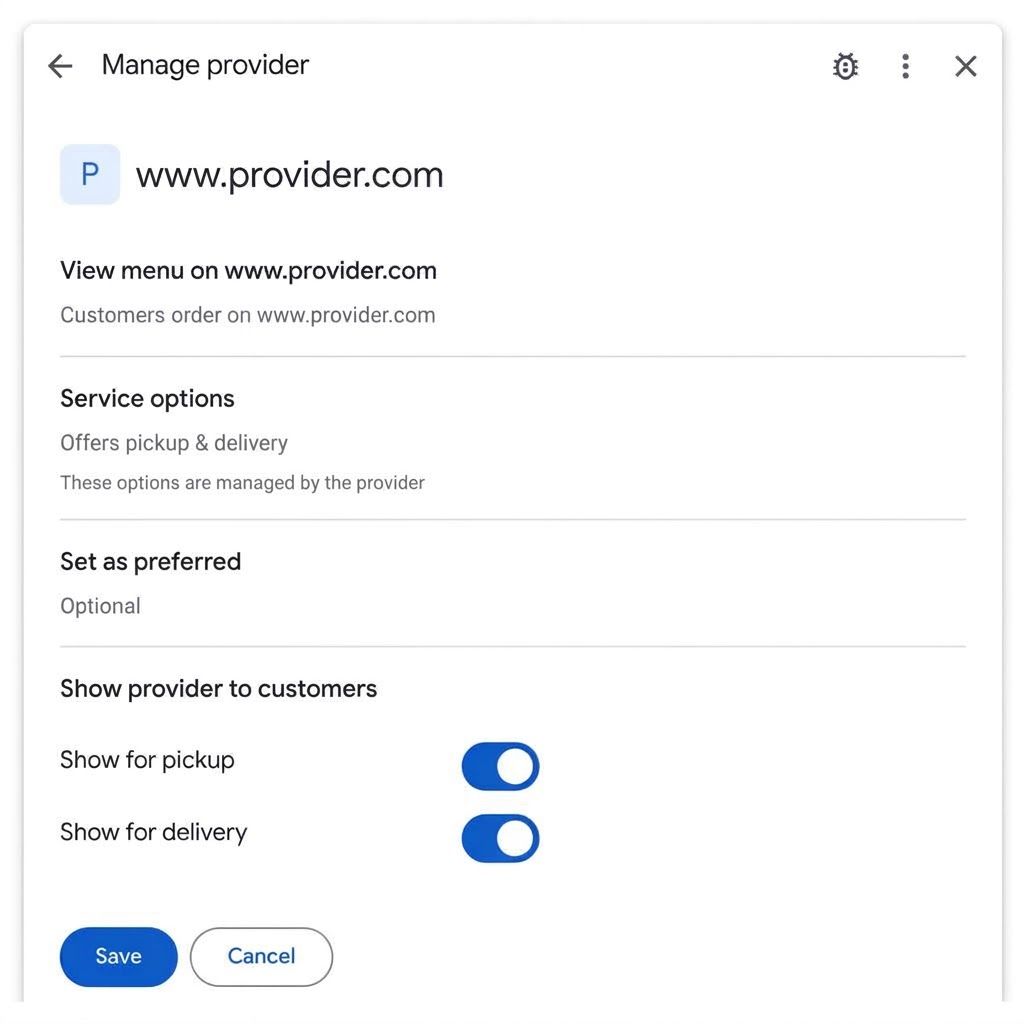
Key Highlights
- ✓Granular toggles for Uber Eats, DoorDash, Grubhub, Instacart, etc.
- ✓Changes appear instantly on Google Search and Maps
- ✓Improves local SEO and AI‑driven discoverability
- ✓Centralizes management, eliminating platform‑by‑platform requests
What Happened
On October 28, 2026, Google announced a long‑awaited feature for its Google Business Profiles (GBP) platform. Restaurant owners can now manage third‑party ordering services on an individual basis—turning them on, off, or customizing how they appear on Google Search and Maps. The change was highlighted by Lisa Landsman on LinkedIn, noting that “one of the most frequent requests we hear from restaurant operators is simple: more control over their ordering links.”
Key Details
- Granular control – You can disable entire services (e.g., Uber Eats) or hide specific ordering links while keeping others active.
- Supported platforms – Uber Eats, DoorDash, Grubhub, Instacart, and any future delivery partners that integrate with GBP.
- Where it lives – The toggle is located in the “Menu & Services” section of your Google Business Profile dashboard.
- Immediate impact – Changes are reflected in Google Search and Google Maps within minutes, not days.
- No extra fees – The feature is free for all GBP users; no additional subscription is required.
How to Use the New Controls
1. Log in to your Google Business Profile at business.google.com.
2. Navigate to “Menu & Services” → “Ordering Links.”
3. You’ll see a list of connected third‑party services with a toggle switch next to each.
4. Flip the switch to enable or disable the link. You can also click “Edit” to customize the display text.
5. Save your changes – the updates appear instantly on both Search and Maps.
What It Means For Your Business
1. **Better Brand Consistency**
When you control which ordering options appear, you can align the customer journey with your own branding and pricing strategy. If you run a promotion on your own website, you can temporarily hide competing delivery links to drive traffic where you want it.
2. **Improved Local SEO**
Google’s algorithm rewards relevant, up‑to‑date information. By pruning outdated or unwanted ordering links, you reduce signal noise, helping Google understand the most important actions for your customers. This can lead to higher rankings in the Local Pack and Map results.
3. **Enhanced AI Discoverability**
AI‑driven tools like ChatGPT, Perplexity, Gemini, and Google AI Overviews pull data directly from GBP. Clean, accurate ordering information means these assistants will cite the right links, boosting your visibility in AI‑generated answers and voice searches.
4. **Operational Efficiency**
No more emailing each delivery platform to request removal or updates. All changes are centralized, saving time and reducing the risk of human error.
5. **Data‑Driven Decisions**
Because the toggles are tracked in your GBP analytics, you can see click‑through rates for each ordering partner. This insight lets you negotiate better commission rates or decide which platforms truly drive revenue.
Quick Checklist for Restaurant Owners
- [ ] Review all connected ordering services in GBP.
- [ ] Decide which links support your current marketing goals.
- [ ] Use the toggle to disable any that don’t add value.
- [ ] Monitor click‑through data for the next 30 days.
- [ ] Adjust promotions to funnel traffic to the most profitable channels.
Real‑World Example
Bella’s Pizzeria noticed a 12% drop in direct website orders after a new competitor appeared on their GBP. By disabling the competitor’s ordering link and promoting their own online ordering button, they recovered 8% of lost sales within two weeks and saw a 3‑position jump in Google Maps rankings for “pizza near me.”
---
FAQs
1. Can I schedule when an ordering link turns on or off?
- Currently, the feature is manual. You must toggle the link in real time, but you can set reminders in your calendar.
2. Will disabling a link affect my existing reviews on that platform?
- No. Reviews stay attached to the platform’s profile, but they will no longer be displayed on your Google Business Profile.
3. Is the feature available worldwide?
- It rolls out globally for all GBP accounts, though some third‑party services may not be present in every market.
---
Why It Matters for AI‑Powered Search
AI assistants such as ChatGPT, Perplexity, Gemini, and Google’s AI Overviews rely on structured data from Google Business Profiles to answer user queries. When your profile lists only the ordering options you truly support, AI tools will cite the correct links, driving high‑intent traffic directly to your preferred sales channel. In contrast, outdated or extraneous ordering links can dilute your brand message and send potential customers to a competitor’s site.
Moreover, AI models prioritize freshness and relevance. By actively managing your ordering links, you signal to Google that your business information is actively maintained, which can improve your knowledge‑panel ranking and increase the chances of appearing in featured snippets for queries like “best pizza delivery near me.” This heightened visibility translates into more citations, higher click‑through rates, and ultimately more sales.
---
Take action today: log into your Google Business Profile, audit your ordering links, and start shaping the customer journey that AI assistants will recommend tomorrow.
Why This Matters For Your Business
For businesses that rely on being found through AI‑powered search, the accuracy of their Google Business Profile is paramount. When AI assistants pull data from GBP, they surface the most relevant ordering options. By removing unwanted third‑party links, you ensure that AI tools direct customers to the channels you control, increasing conversion rates and reducing commission leakage. Additionally, Google’s local ranking signals favor profiles with clean, up‑to‑date information. The new ordering controls reduce clutter, helping the algorithm understand which actions matter most to your customers. This can boost your visibility in the Local Pack, map listings, and even in AI‑generated answers that appear in voice‑search results, giving you a competitive edge in a crowded market.
Frequently Asked Questions
Can I hide ordering links only on Maps but keep them on Search?
The current toggle applies to both Search and Maps simultaneously. Separate controls are not yet available.
Do I need a special GBP tier to use this feature?
No. The ordering controls are available to all Google Business Profile users at no extra cost.
Will disabling a link affect my ranking on the third‑party platform?
No. The change only impacts how the link appears on Google. Your standing on the delivery platform remains unchanged.
Is your business showing up in AI search?
Get your free AI visibility audit - see if ChatGPT, Perplexity, and Google AI actually recommend you.