
Home / News / Google Business Profiles Expands AI‑Powered Messaging to Small Biz
Google Business Profiles Expands AI‑Powered Messaging to Small Biz
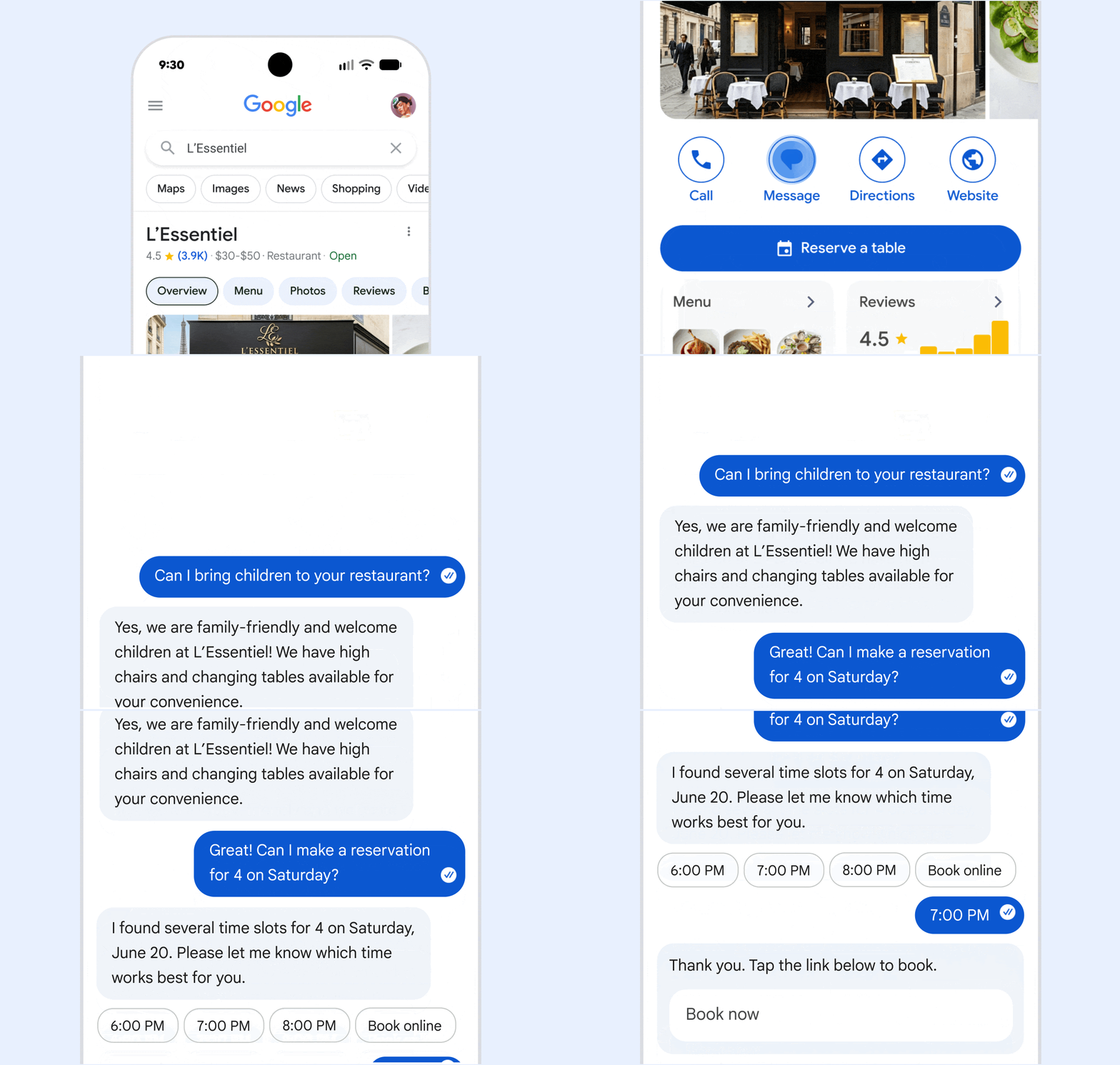
Google is extending its AI‑powered messaging feature in Google Business Profiles to thousands of additional U.S., Canadian, UK, Australian, and EU businesses. The chatbot answers routine queries instantly and transfers the conversation to a human owner when needed, all at no extra charge.
Key Highlights
- ✓AI‑powered messaging now available to more businesses across multiple countries
- ✓Instant, free answers to routine customer questions via native chat apps
- ✓Seamless hand‑off to human agents when the AI can’t respond
- ✓Improves AI search citations and local SEO visibility
What Happened
On October 29, 2026, Google announced that the AI‑powered messaging tool in Google Business Profiles (formerly Google My Business) is being expanded to a broader set of businesses. First introduced as a limited pilot in June 2026, the feature now reaches thousands of additional storefronts, service providers, and online‑only brands. The tool lives inside the Message button on a Business Profile, allowing customers to start a conversation from Google Search or Google Maps using their phone’s native messaging app (iMessage, WhatsApp, SMS, etc.).
The AI agent works 24/7, fielding common queries—hours, pricing, appointment availability, product details—instantly and at no cost. If the bot encounters a question it can’t answer, it automatically hands the chat over to the business owner, who can take over in real time.
Key Details
- Roll‑out scope: Initially limited to U.S. businesses with verified profiles; the latest expansion adds Canada, the UK, Australia, and several EU markets.
- Eligibility: Must have a verified Google Business Profile, a phone number linked to the profile, and the “Message” button enabled.
- AI capabilities: Powered by Google’s Gemini model, the bot can understand natural language, pull data from the profile (hours, services, FAQs) and even reference recent reviews.
- Human hand‑off: Business owners receive a push notification when a hand‑off occurs and can reply from the Google Business Profile dashboard or the Google Business Profile app.
- No extra cost: The AI responder is free; standard messaging rates from the carrier still apply.
- Data visibility: All conversations are stored in the Business Profile’s messaging inbox, searchable for future reference and analytics.
What It Means For Your Business
1. Faster Response Times = Higher Conversions
Searchers expect answers within seconds. Studies show that a 30‑second response window can boost conversion rates by up to 20 %. The AI bot eliminates the initial wait, delivering instant answers and nudging the user closer to a purchase or booking.
2. Better SEO & AI Citation Signals
Google’s AI‑driven search tools—ChatGPT, Perplexity, Gemini, and the new Google AI Overview—pull structured data from Business Profiles. An active messaging inbox signals to these models that the business is engaged and up‑to‑date, improving the chances of being cited in AI‑generated answers.
3. Reduced Operational Load
Small teams often struggle to monitor messages across multiple platforms. The bot handles routine inquiries, freeing staff to focus on higher‑value tasks like personalized follow‑ups or service delivery.
4. Consistent Brand Voice
Because the AI draws from the information you provide (FAQs, service list, tone guidelines), every response reflects your brand’s voice, reducing the risk of mixed messaging.
How to Get Started
1. Verify your profile – Ensure your Google Business Profile is claimed and fully verified.
2. Enable the Message button – In the Google Business Profile dashboard, toggle the “Message” option on.
3. Activate AI‑powered messaging – A new toggle labeled “AI‑assisted replies” will appear; turn it on.
4. Populate profile data – Add detailed hours, service descriptions, pricing tiers, and a concise FAQ. The richer the data, the smarter the bot.
5. Set hand‑off preferences – Choose whether you want instant notifications on your phone, email, or both when the AI escalates a conversation.
6. Test the flow – Search for your business on Google, click the Message button, and send a sample query to see the AI in action.
Best Practices
- Keep FAQs up to date – The bot relies heavily on the FAQ section; outdated answers lead to poor user experiences.
- Monitor hand‑offs – Review escalated chats weekly to spot gaps in the AI’s knowledge and improve your profile content.
- Use quick replies – When you take over, pre‑written templates speed up response times and maintain consistency.
- Leverage analytics – The Business Profile dashboard now shows metrics such as “AI‑answered queries” and “Conversion rate from chat.” Use these to refine your messaging strategy.
- Stay compliant – Inform customers that an AI may initially respond, especially if you operate in regions with strict consumer‑protection rules.
Looking Ahead
Google hints that future updates will integrate the AI messenger with Google Ads, allowing advertisers to route ad clicks directly into a chat conversation. Additionally, the company is experimenting with multilingual support, which could let businesses automatically converse in the language of the searcher—an enormous advantage for multicultural markets.
For VisibilityAI’s audience—local storefronts, niche service providers, and small e‑commerce sites—this rollout is a timely opportunity. By adopting AI‑powered messaging now, you position your business at the front of the next generation of AI‑driven search, where instant, conversational answers will become the default way consumers discover and verify local options.
---
Ready to get started? Visit the Google Business Profile help center or contact VisibilityAI for a step‑by‑step onboarding session.
Why It Matters: In the era of generative‑AI search, tools like ChatGPT, Perplexity, Gemini, and Google’s own AI Overview pull information directly from structured business data. A Business Profile that actively engages customers through AI‑assisted messaging signals to these models that the business is current, responsive, and trustworthy. That signal translates into higher placement in AI‑generated answers and more citations, which are the new currency of local discovery.
For small‑to‑medium businesses, the feature also solves a practical problem: limited staff can’t monitor every inbound query 24/7. The AI handles the low‑effort, high‑volume questions—hours, location, pricing—while alerting owners only when a human touch is truly needed. The result is faster response times, better conversion rates, and a stronger online reputation, all without adding payroll costs.
By integrating AI messaging today, you future‑proof your local SEO strategy and ensure that when a consumer asks an AI assistant, "Where can I find a reliable plumber near me?", your business is ready to be the answer.
Why This Matters For Your Business
Generative‑AI platforms now surface local businesses directly in conversational answers, so a profile that shows active, AI‑mediated engagement gets a credibility boost. When Google’s Gemini or other models see a lively messaging inbox, they treat the business as up‑to‑date, increasing the odds of being cited in AI‑generated results. For owners of small‑to‑medium enterprises, the rollout addresses a common bottleneck: the inability to answer every inquiry around the clock. The chatbot takes care of routine, high‑volume questions—hours, location, pricing—while notifying the owner only when a nuanced, human response is required. This workflow cuts response latency, lifts conversion rates, and strengthens the brand’s online reputation without inflating labor costs.
Frequently Asked Questions
Is there any cost to use Google’s AI‑powered messaging?
The AI responder is free; you only pay any standard carrier fees for SMS, iMessage, or other messaging services, just as you would with a regular text.
Can I turn off the AI and only use human replies?
Yes. In the Business Profile dashboard you can disable the “AI‑assisted replies” toggle at any time and revert to manual messaging only.
How does the AI know what to answer?
The bot pulls information from your profile—hours, services, FAQs, and recent reviews. The more detailed and accurate your profile data, the better the AI’s answers.
Is your business showing up in AI search?
Get your free AI visibility audit - see if ChatGPT, Perplexity, and Google AI actually recommend you.