
Home / News / Google Business Profiles Now Request EIN: What to Do
Google Business Profiles Now Request EIN: What to Do
Google Business Profiles now ask for an Employer Identification Number (EIN) and a public privacy‑policy URL when you enable or update the messaging button. The added step is meant to tighten data‑privacy compliance and give AI assistants clearer trust signals, while giving businesses a short review period before the feature goes live.
Key Highlights
- ✓Google now requires an EIN and privacy policy URL for certain Google Business Profile updates
- ✓The change applies to businesses using the messaging feature and is aimed at protecting customers
- ✓Verification takes 3‑4 business days before the messaging button can be activated
- ✓An EIN‑verified profile boosts trust signals for AI assistants and can improve local search visibility
What Happened
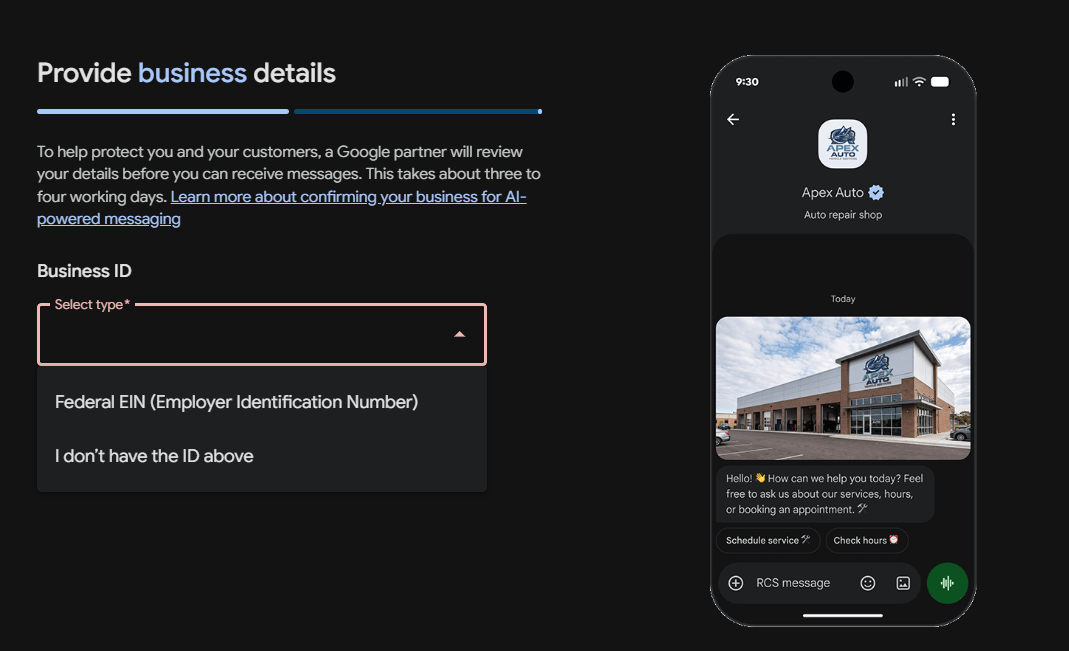
Google has revised the onboarding flow for Google Business Profiles (GBP). When a business enables the Message feature—or updates key profile fields—Google now prompts for two pieces of information: an Employer Identification Number (EIN) and a link to a publicly accessible privacy policy. The prompt, first shared by Barry Schwartz after a user named Syed Amir posted a screenshot, explains that a Google partner will review the details for three to four business days before messages can be received.
Key Details
- Who is affected? Small and medium‑size businesses that have a verified GBP and are located in the United States or in any country where Google requires an EIN for tax reporting.
- What is an EIN? A nine‑digit number issued by the IRS that uniquely identifies a business for tax purposes. It appears on every business tax return.
- Privacy‑policy requirement – Google now asks for a URL that points to a privacy policy that is publicly viewable, written in English (or the local language), and explains how customer data is collected, used, and shared.
- Verification timeline – After you submit the EIN and policy link, a Google partner reviews the submission. Barry notes the review typically takes three to four working days before the messaging button is activated.
- Why the change? Google says the goal is to “protect you and your customers” by ensuring businesses meet privacy regulations and can be held accountable for data received through messages.
What It Means For Your Business
1. Updated Compliance Checklist
You now must enter an EIN and a privacy‑policy URL before the messaging button can go live. Sole proprietors or partnerships without an EIN will need to apply for one via the IRS website; existing businesses can simply copy the number into the GBP field.
2. Faster Trust Signals for AI Tools
AI assistants such as ChatGPT, Gemini, and Perplexity scrape Google Business Profiles when answering local queries. A profile that lists a verified EIN and a clear privacy policy signals legitimacy to these models, potentially boosting the profile’s credibility score and its placement in AI‑generated answers.
3. Reduced Risk of Account Suspension
The new review step helps Google flag fraudulent or non‑compliant listings early. Providing the required information up front lowers the chance of a suspension or limitation for missing documentation.
4. Potential Marketing Edge
Enabling messaging creates a direct line to prospects, often raising conversion rates. The EIN and privacy‑policy requirements align with best‑practice data‑protection standards, giving you a concrete talking point in marketing materials to showcase your commitment to customer privacy.
How to Get Started
1. Obtain an EIN – If you don’t already have one, apply online at IRS.gov. The service is free and the process usually takes only a few minutes.
2. Draft a privacy policy – Use a reputable generator or consult a lawyer to ensure it covers data collection, usage, sharing, and user rights.
3. Update your GBP – Sign in to Google My Business, go to the Messaging section, and paste your EIN and privacy‑policy URL.
4. Wait for review – Google partners will evaluate the submission; watch your email for the confirmation.
5. Activate messaging – Once approved, you can start receiving messages from potential customers.
Bottom Line
The new EIN and privacy‑policy requirement adds a modest administrative step, but the payoff is sizable. It strengthens trust signals for AI assistants, shields your business from compliance pitfalls, and unlocks the full power of the messaging feature. Aim to have everything in place before the end of the month to keep your local‑SEO momentum on track.
Why This Matters For Your Business
AI assistants like ChatGPT, Gemini, and Perplexity lean heavily on Google Business Profiles to answer local queries. When a profile lists a verified EIN and a publicly accessible privacy policy, the AI can more confidently treat the business as legitimate, compliant, and trustworthy—factors that directly influence whether the assistant surfaces the listing in its response. From a local‑SEO standpoint, Google is increasingly weighting verification signals when ranking listings. By meeting the EIN requirement, you align with broader data‑protection standards, reduce the risk of suspension, and keep your business discoverable both on Google Maps and in AI‑generated answers. For small and medium‑size businesses, the effort of adding an EIN and policy is minimal compared with the potential gain in visibility and consumer confidence.
Frequently Asked Questions
Who needs to provide an EIN?
Businesses that enable the messaging feature or update key profile fields, primarily those based in the U.S. or in countries where Google mandates an EIN for tax purposes.
How long does the review take?
Google partners typically review the submission within three to four business days before the messaging feature can be activated.
What if I don’t have an EIN?
You can apply for one through the IRS website. Sole proprietors may use their Social Security Number, but many prefer to obtain an EIN for a separate business identifier.
Is your business showing up in AI search?
Get your free AI visibility audit - see if ChatGPT, Perplexity, and Google AI actually recommend you.