
Home / News / Google Indexing API Quota Changes: What Small Businesses Must Know
Google Indexing API Quota Changes: What Small Businesses Must Know
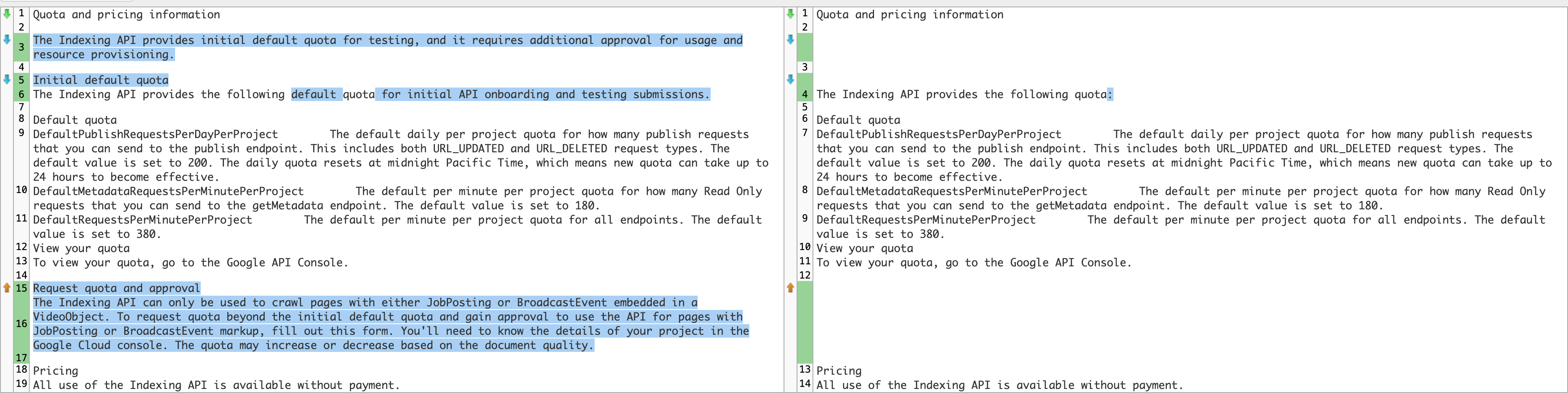
Google has refreshed its Indexing API documentation, removing the legacy approval step and publishing clear default quota limits. Verified site owners can now submit URLs instantly, with a daily cap of 200 URLs and a burst allowance of 500 URLs per hour.
Key Highlights
- ✓Approval process for the Indexing API eliminated
- ✓Default quota disclosed: 200 URLs/day per property
- ✓Sitemap recommendation removed – API works standalone
- ✓Clearer error messages and rate‑limit handling
What Happened
Google has overhauled its Indexing API documentation across three separate pages. The most significant changes are the removal of the legacy approval workflow, the deletion of the sandbox testing guide, and the abandonment of the sitemap recommendation. In addition, Google finally publishes the default quota that developers and site owners can count on when submitting URLs for rapid indexing.
Key Details
- Approval Process Removed – You no longer have to request access or wait for Google to grant permission. Any verified site owner can call the endpoint immediately.
- Testing Guidance Gone – The old “sandbox” instructions have been replaced with a simple “start submitting” approach.
- Sitemap Recommendation Dropped – The Indexing API now works as a stand‑alone tool; pairing it with a sitemap is optional, not required.
- Default Quota Revealed – Google sets a limit of 200 URLs per day per property, with a burst capacity of 500 URLs in a single hour. Exceeding these limits triggers a temporary throttle, but you can request higher limits through the Search Console UI.
- Error Handling Updated – Response codes now return clearer messages for rate‑limit hits, malformed requests, and non‑indexable content.
What It Means For Your Business
For local and small enterprises, the Indexing API offers a fast‑track to push new pages—such as product launches, event announcements, or location updates—into Google’s index within minutes instead of days. Eliminating the approval step means you can begin using the API right away, shortening the gap between content creation and online visibility.
Faster AI‑Driven Discovery
AI assistants like ChatGPT, Perplexity, and Google’s Gemini draw answers from Google’s index. When your pages appear quickly, they stand a better chance of being cited in those AI‑generated responses, driving organic traffic and local citations.
Predictable Quota Management
Knowing you have 200 daily submissions lets you align your content calendar with marketing pushes. A restaurant could publish daily specials, a retailer could feed new product pages, and a service provider could refresh location pages—all without worrying about an unexpected quota block.
How to Adapt
1. Audit Your URL Submission Strategy – Identify the pages that need indexing each day and rank them by impact (new products, events, location updates).
2. Implement Automated Submissions – Deploy a simple script or a third‑party solution (such as VisibilityAI) to batch‑submit up to 200 URLs daily.
3. Monitor Quota Usage – Search Console now displays real‑time usage. Set up alerts for throttling messages so you can pause and resume submissions gracefully.
4. Request Higher Limits When Needed – During seasonal spikes (e.g., a holiday catalog), submit a request via Search Console for a temporary boost.
5. Combine With Structured Data – Enrich fast‑indexed pages with schema markup (LocalBusiness, Product, Event) to give AI tools richer context, increasing the likelihood of being quoted.
Bottom Line
Google’s clarification of the Indexing API quota removes guesswork and accelerates the path from content creation to AI‑powered discovery. For small businesses that depend on local searches and AI answers, this change is a genuine game‑changer. Start using the API today, keep an eye on your daily limits, and watch your brand surface more often in next‑gen search experiences.
---
Quick Checklist
- ✅ No approval needed – just verify ownership.
- ✅ 200 URLs/day, 500 URLs/hour burst.
- ✅ Use structured data for richer AI citations.
- ✅ Monitor quota in Search Console.
- ✅ Request higher limits for peak periods.
By integrating these steps into your SEO workflow, you’ll ensure that every new piece of content gets the fastest possible exposure across traditional and AI‑driven search platforms.
Why It Matters: For businesses that want to appear in AI‑driven search assistants, speed of indexing can be decisive. Tools such as ChatGPT and Perplexity draw answers directly from Google’s index; if a page isn’t indexed within minutes, it may never surface in an AI‑generated response. By eliminating the approval hurdle and publishing exact quota limits, Google gives marketers a predictable pipeline for pushing fresh, relevant content straight into the index.
Local enterprises benefit even more. A newly opened café, a seasonal service, or a limited‑time promotion can be indexed within minutes, boosting the chance that an AI assistant will cite the business when a user asks for nearby recommendations. Transparent quota numbers also enable precise campaign planning, removing the fear of sudden throttling and ensuring that advertising spend translates into visible AI results.
Why This Matters For Your Business
Why It Matters: For businesses that want to appear in AI‑driven search assistants, speed of indexing can be decisive. Tools such as ChatGPT and Perplexity draw answers directly from Google’s index; if a page isn’t indexed within minutes, it may never surface in an AI‑generated response. By eliminating the approval hurdle and publishing exact quota limits, Google gives marketers a reliable, predictable way to push fresh, relevant content straight into the index. Local enterprises benefit even more. A newly opened café, a seasonal service, or a limited‑time promotion can be indexed within minutes, increasing the odds that an AI assistant will mention the business when users seek nearby recommendations. Transparent quota numbers also allow precise campaign planning, removing the fear of sudden throttling and ensuring that marketing spend translates into visible AI results.
Frequently Asked Questions
Do I still need to request access to the Indexing API?
No. As long as you verify site ownership in Search Console, you can start submitting URLs immediately.
What happens if I exceed the 200‑URL daily limit?
Google will temporarily throttle your requests and return a rate‑limit error; you can wait for the quota to reset or request a higher limit through Search Console.
Can I still use a sitemap alongside the Indexing API?
Yes, you may keep a sitemap, but it’s no longer required; the API now functions independently, so you can choose the workflow that best fits your needs.
Is your business showing up in AI search?
Get your free AI visibility audit - see if ChatGPT, Perplexity, and Google AI actually recommend you.