
Home / News / Google Merchant Center Video Glitch Halts Product Video Play – What Small Businesses Must Do
Google Merchant Center Video Glitch Halts Product Video Play – What Small Businesses Must Do
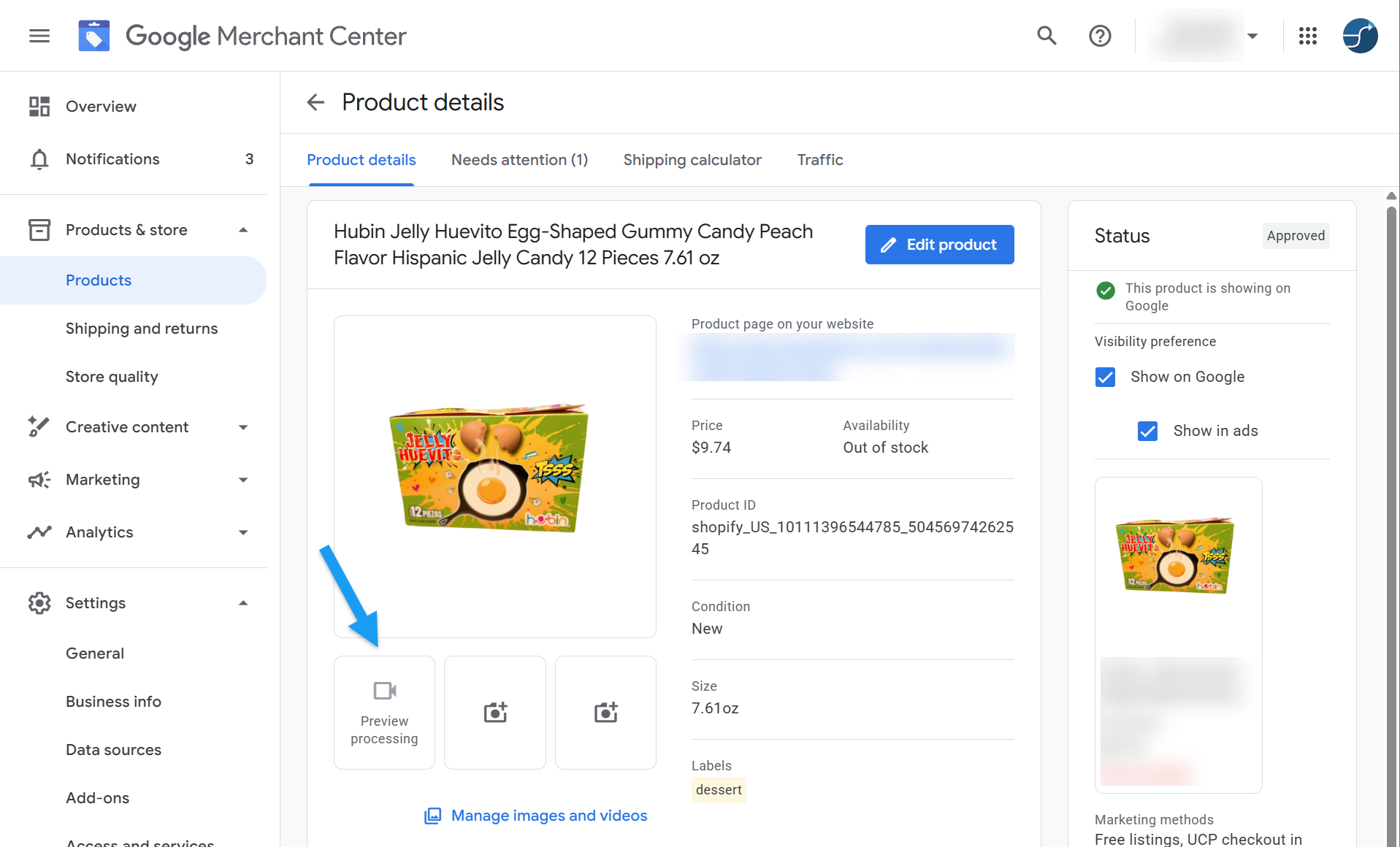
A new bug in Google Merchant Center is leaving product videos stuck in “preview processing,” turning them into static thumbnails on Shopping and AI‑driven search results. The loss of playable video removes a high‑impact visual cue, which can lower impressions, click‑through rates, and conversions for local businesses. This piece explains quick work‑arounds and longer‑term tactics to protect your AI‑driven visibility.
Key Highlights
- ✓Google Merchant Center videos stuck in preview processing affect all merchants.
- ✓Static thumbnails reduce AI‑driven visibility and conversion rates.
- ✓Immediate mitigation: add supplemental images, rich descriptions, alternate video hosts.
- ✓Long‑term: diversify content, use structured data, monitor AI indexing.
Summary: A new bug in Google Merchant Center leaves product videos stuck in “preview processing,” rendering them static on Google Shopping and AI‑driven search results. Learn why it matters for local brands and how to mitigate the impact.
What Happened?
On October 13, 2026, Search Engine Roundtable reported a widespread issue in Google Merchant Center (GMC). Product videos—whether hosted on YouTube, a brand’s own site, or a third‑party platform—are getting stuck in the preview processing stage. Instead of playing, the videos appear as frozen thumbnails on Google Shopping listings, Google Search product cards, and any AI‑generated overviews that pull from GMC data.
The problem first surfaced when Joey Bidner raised the alarm, and it was quickly amplified by Emmanuel Flossie on FeedArmy and LinkedIn. Both confirmed that every video uploaded to GMC is affected, regardless of its source.
Key Details
- Scope: All merchants using GMC video assets are seeing the issue; there is no known workaround from Google yet.
- Symptoms: In the GMC UI, the video status reads “preview processing” indefinitely. On the front‑end, the video thumbnail is static and the play button is disabled.
- Platforms Impacted: Google Search product cards, Google Shopping, Google Lens, and AI tools that surface product data (e.g., ChatGPT’s web‑search plugin, Perplexity, Gemini, Google AI Overviews).
- Current Status: Google has not issued an official statement, but community forums suggest the bug is being investigated.
Why It Matters for Your Business
Visibility in AI‑Powered Search
Modern AI assistants scrape structured product data from GMC to generate rich answers. When a video is stuck in preview, the AI can’t extract the video content, meaning your product loses a high‑impact visual cue that often drives click‑throughs. For local and small businesses that rely on visual differentiation, this can translate into lower impressions and fewer qualified leads.
Conversion Rates Drop
Video content historically boosts e‑commerce conversion by up to 30 % (source: Google Merchant Center case studies). A static thumbnail removes that advantage, especially on mobile where users scroll quickly. The glitch could therefore shave off a noticeable chunk of sales during the outage.
Brand Trust & Credibility
Customers expect seamless experiences. A broken video can appear as a technical glitch on your brand, eroding trust—particularly for niche retailers where product demos are essential (e.g., handmade crafts, boutique apparel, specialty foods).
Immediate Steps to Mitigate the Issue
1. Audit Your GMC Video Assets
- Log into Merchant Center → Products → Videos.
- Identify any items showing “preview processing”.
2. Add Supplemental Images
- Upload high‑quality images that showcase the product from multiple angles.
- Use structured data (image and additionalImageLink) to compensate for missing video.
3. Leverage Rich Text in Product Descriptions
- Insert key benefit bullets and call‑to‑action phrases that can be parsed by AI tools.
4. Create Alternate Video Links
- Host the same video on a different platform (e.g., Vimeo) and reference it in the product description.
- While not a direct GMC video, AI tools may still surface the link if it’s indexed.
5. Monitor Google’s Status Dashboard
- Keep an eye on the Google Ads & Merchant Center status page for official updates.
6. Communicate with Customers
- Add a short note on your website or social channels: “Our product videos are temporarily unavailable; please view images or contact us for a demo.”
Long‑Term Strategies
- Diversify Content Channels: Don’t rely solely on GMC videos. Publish product demos on your own site, embed them in blog posts, and share on social platforms where AI can still index them.
- Implement Structured Data Beyond GMC: Use Schema.org
VideoObjectmarkup on your site. This gives AI assistants a fallback source if GMC videos are down. - Stay Updated on AI Indexing Trends: VisibilityAI’s roadmap highlights the growing importance of multimodal content (text + video) for AI citations. Regularly audit how your assets appear in AI‑driven SERPs.
- Test with AI Tools: Run queries on ChatGPT, Perplexity, and Gemini using your product name to see if the video is referenced. Adjust metadata accordingly.
What It Means for Your Business
The glitch underscores a broader reality: AI search is only as good as the data it can access. When a key asset like a product video becomes invisible, your brand’s AI footprint shrinks. For small businesses, this can mean missing out on the next wave of voice‑first and chat‑based commerce.
By proactively supplementing video content with rich images, structured data, and alternative hosting, you safeguard your visibility across both traditional Google Shopping and emerging AI platforms. The goal is to ensure that whether a consumer types a query into Google Search or asks their virtual assistant, your product still shines—even without the video.
---
Bottom line: The GMC video preview bug is a temporary roadblock, but it reveals the fragile reliance on a single channel. Diversify, optimize, and keep an eye on AI‑driven search trends to stay discoverable and cited.
Key Takeaways
- Video assets stuck in preview processing become static thumbnails.
- AI tools can’t pull video content, reducing visual impact and click‑through rates.
- Mitigate quickly with supplemental images, rich descriptions, and alternative video hosts.
- Adopt long‑term diversification and structured data to future‑proof AI visibility.
---
Frequently Asked Questions
1. Will removing the video fix the issue?
- Deleting the video won’t restore playback; it merely removes the broken asset. Use the steps above to replace it with other media.
2. Can I still use YouTube links in GMC?
- Yes, but they are currently affected by the same bug. Hosting the video elsewhere may provide a temporary workaround.
3. How long will Google take to resolve this?
- Google has not announced a timeline. Monitor the Merchant Center status page and community forums for updates.
---
Stay ahead of AI‑driven discovery with VisibilityAI – the platform that helps local businesses get found and cited by the next generation of search tools.
Why It Matters: For businesses that depend on local discovery, product videos are a high‑impact signal that AI assistants like ChatGPT, Perplexity, and Google AI Overviews use to answer shopper queries. When those videos freeze, the AI can’t surface the visual proof that often convinces a buyer to click, leading to fewer impressions and lost sales. Moreover, many AI tools now pull directly from Google Merchant Center data; a broken video means your brand’s story is incomplete in the very platforms that are reshaping how consumers research and purchase locally.
VisibilityAI helps small businesses ensure their products are not just listed, but cited by AI. By addressing the GMC video glitch now—adding richer images, structured data, and alternative video sources—you preserve the signals that AI tools need to reference your brand. This proactive approach keeps your business visible in the evolving AI‑first search landscape, protecting both traffic and revenue while Google works on a fix.
Why This Matters For Your Business
AI‑driven assistants now rely heavily on structured product data from Google Merchant Center to craft rich, visual answers. When a video remains stuck in preview processing, the assistant cannot retrieve the moving image, stripping away a persuasive cue that drives clicks and conversions. For local retailers that differentiate themselves through product demos—such as handmade crafts, boutique apparel, or specialty foods—this loss can translate into noticeably lower impression counts and fewer qualified leads. Beyond immediate traffic, the issue highlights a deeper dependency on a single channel for AI visibility. As voice‑first and chat‑based commerce grow, missing video content shrinks a brand’s AI footprint, making it harder for virtual assistants to recommend the product. By bolstering listings with high‑quality images, robust schema markup, and alternative video hosts, businesses can safeguard their presence across both traditional Shopping results and emerging AI platforms.
Frequently Asked Questions
Will the video eventually process on its own?
Google has not confirmed an automatic resolution timeline. Historically, similar bugs have required a manual fix from Google, so it’s safest to treat the issue as ongoing until an official update is posted.
Can I use a different video format to avoid the bug?
The issue appears tied to the GMC processing pipeline, not the video format. Switching formats (MP4, MOV) won’t bypass the preview‑processing lock.
How can I test if AI tools are still seeing my product video?
Run a query on ChatGPT or Perplexity that includes your product name and brand. If the response references a video or shows a static thumbnail, the video is still not indexed. Check the AI’s source citations for clues.
Is your business showing up in AI search?
Get your free AI visibility audit - see if ChatGPT, Perplexity, and Google AI actually recommend you.