
Home / News / Google Search Console Adds Multi-Select Device Filters to Reports
Google Search Console Adds Multi-Select Device Filters to Reports
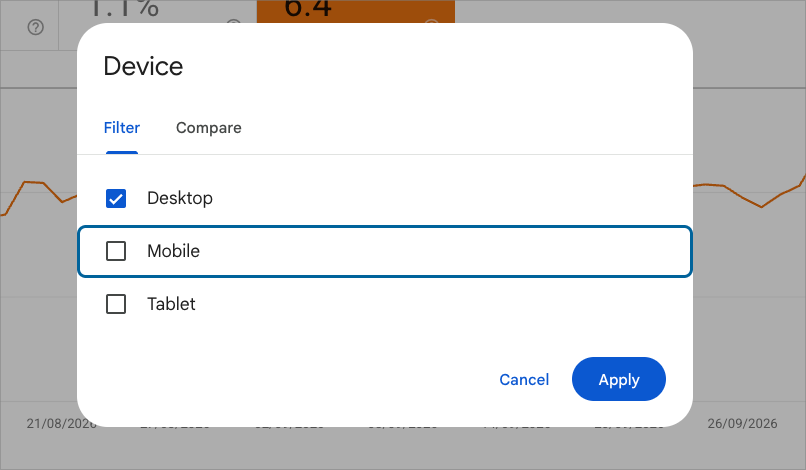
Google Search Console now lets users filter Performance reports by multiple device types—Desktop, Mobile, and Tablet—in one view. This upgrade simplifies audience analysis as search behavior shifts across devices in the AI‑driven era.
Key Highlights
- ✓Google Search Console now supports multi-select device filtering for Desktop, Mobile, and Tablet.
- ✓Eliminates the previous restriction that forced users to view either all devices or a single device at a time.
- ✓Follows the recent rollout of multi-select country filters in the GSC Performance report.
- ✓Enables faster analysis of cross-device user intent and AI Overview impact without external data tools.
What Happened
Google has officially rolled out a new multi‑select filtering capability for device types inside its Performance reports. First spotted by SEO practitioner Dan Richardson and confirmed across industry accounts, the update lets users select more than one device category at the same time when analyzing organic search performance.
Previously, search marketers were limited to choosing just one device type at a time—Desktop, Mobile, or Tablet—or viewing an aggregate of all devices. This update follows a parallel improvement introduced by Google a few weeks earlier that added multi‑select country filtering to the same report.
Key Details of the Update
With this quiet but impactful functional improvement, users navigating to the Search Console Performance report can refine their clicks, impressions, average CTR, and average position metrics by checking any combination of:
- Desktop
- Mobile
- Tablet
Before this change, if you wanted to examine combined handheld traffic—such as grouping mobile smartphones and tablets together to contrast against traditional desktop workstations—you had to export raw CSV datasets or connect Search Console to Google Looker Studio or BigQuery to build custom calculations. Now, digital marketers and local business owners can immediately tick the boxes for “Mobile” and “Tablet” directly within the web dashboard to isolate touchscreen behavior with two clicks.
This continuous refinement of Search Console’s UI demonstrates Google’s commitment to giving webmasters quicker access to segmented search data without requiring external business‑intelligence software.
What It Means For Your Business
For small business owners and marketing teams, device segmentation is no longer just about checking whether your website is responsive. As search engines integrate artificial intelligence into the core user experience, the device a customer uses fundamentally alters how search results—and AI answers—are rendered.
1. Better Insights Into AI Overviews by Device
Google AI Overviews (formerly SGE) do not display identically across devices. On a desktop screen, an AI Overview often sits alongside complex sidebar panels, citations, and traditional organic links. On a mobile device, a single AI Overview can monopolize the entire viewport above the fold.
By grouping mobile and tablet devices, you can quickly evaluate whether mobile search clicks are dropping due to AI Overview expansion or if your brand citations within AI snapshots are driving mobile conversion spikes.
2. Streamlined Reporting for Local Intent
Local and “near me” queries are heavily concentrated on mobile devices, while deeper B2B evaluations and service comparisons frequently happen on desktop. The ability to filter devices quickly allows small businesses to analyze query performance across specific operational contexts:
- Evaluate on‑the‑go queries: Combine mobile and tablet data to inspect search queries driving urgent calls, local map lookups, and quick answers.
- Audit desktop conversion queries: Isolate desktop traffic to see how high‑consideration informational guides and long‑form service pages perform.
3. Actionable Technical and Conversion Optimization
If your Performance report reveals high mobile impressions but significantly lower click‑through rates compared to desktop for the same keyword cluster, it often signals an issue with mobile SERP presentation. Your mobile snippets might be truncated, competitor local packs might be pushing your listing down, or AI Overviews may be resolving the searcher’s intent before they ever click through.
This new multi‑select feature saves valuable time each month when reporting to stakeholders, auditing search campaigns, or planning content updates designed to capture both traditional organic listings and generative engine citations.
Why It Matters
As generative AI engines transform search, user behavior diverges sharply across devices. Searchers on mobile devices interact with conversational summaries, quick‑action prompts, and AI Overviews differently than users conducting multi‑tab research on desktop browsers. Being able to effortlessly group or segment mobile and tablet traffic gives businesses immediate clarity into where their visibility is winning or losing.
For local businesses targeting generative‑engine optimization (GEO), visibility often hinges on how AI engines synthesize content for smaller screens. On mobile, an AI Overview often completely covers the viewport, meaning your business must be cited directly in that summary to capture any traffic at all. Analyzing combined handheld data helps identify which pages are retaining search visibility despite AI‑driven SERP changes.
Ultimately, this update reduces the friction needed to make strategic marketing decisions. Instead of building Looker Studio dashboards just to combine mobile and tablet metrics, marketers can spot device‑specific traffic trends instantly and tailor their website content for maximum discovery across AI assistants and traditional search alike.
FAQs:
Why This Matters For Your Business
As generative AI engines transform search, user behavior is diverging sharply across devices. Searchers on mobile devices interact with conversational summaries, quick-action prompts, and AI Overviews differently than users conducting multi-tab research on desktop browsers. Being able to effortlessly group or segment mobile and tablet traffic gives businesses immediate clarity into where their visibility is winning or losing. For local businesses targeting generative engine optimization (GEO), visibility often hinges on how AI engines synthesize content for smaller screens. On mobile, an AI Overview often completely covers the viewport, meaning your business must be cited directly in that summary to capture any traffic at all. Analyzing combined handheld data helps identify which pages are retaining search visibility despite AI-driven SERP changes. Ultimately, this update reduces the friction needed to make strategic marketing decisions. Instead of wasting time building Looker Studio dashboards just to combine mobile and tablet metrics, marketers can spot device-specific traffic trends instantly and tailor their website content for maximum discovery across AI assistants and traditional search alike.
Frequently Asked Questions
How do I access the new multi-select device filter in Google Search Console?
Navigate to the Performance report in Google Search Console, click the 'Device' filter at the top of the report (or click '+ New' and select 'Device'), and check off the multiple device types (Desktop, Mobile, Tablet) you want to include.
Can I combine both country and device multi-select filters at the same time?
Yes. Google Search Console allows you to stack multiple dimensions, meaning you can apply both multi-select country filters and multi-select device filters simultaneously to zero in on specific target audiences.
Why would I want to group mobile and tablet traffic together?
Grouping mobile and tablet traffic allows you to examine touch-based, portable browsing behavior in contrast to stationary desktop behavior. It helps businesses analyze local intent, mobile AI Overview dominance, and responsive UX performance without skewing the numbers with desktop data.
Is your business showing up in AI search?
Get your free AI visibility audit - see if ChatGPT, Perplexity, and Google AI actually recommend you.