
Home / News / Google Sponsored Places Hover Expand – Boost Local Visibility
Google Sponsored Places Hover Expand – Boost Local Visibility
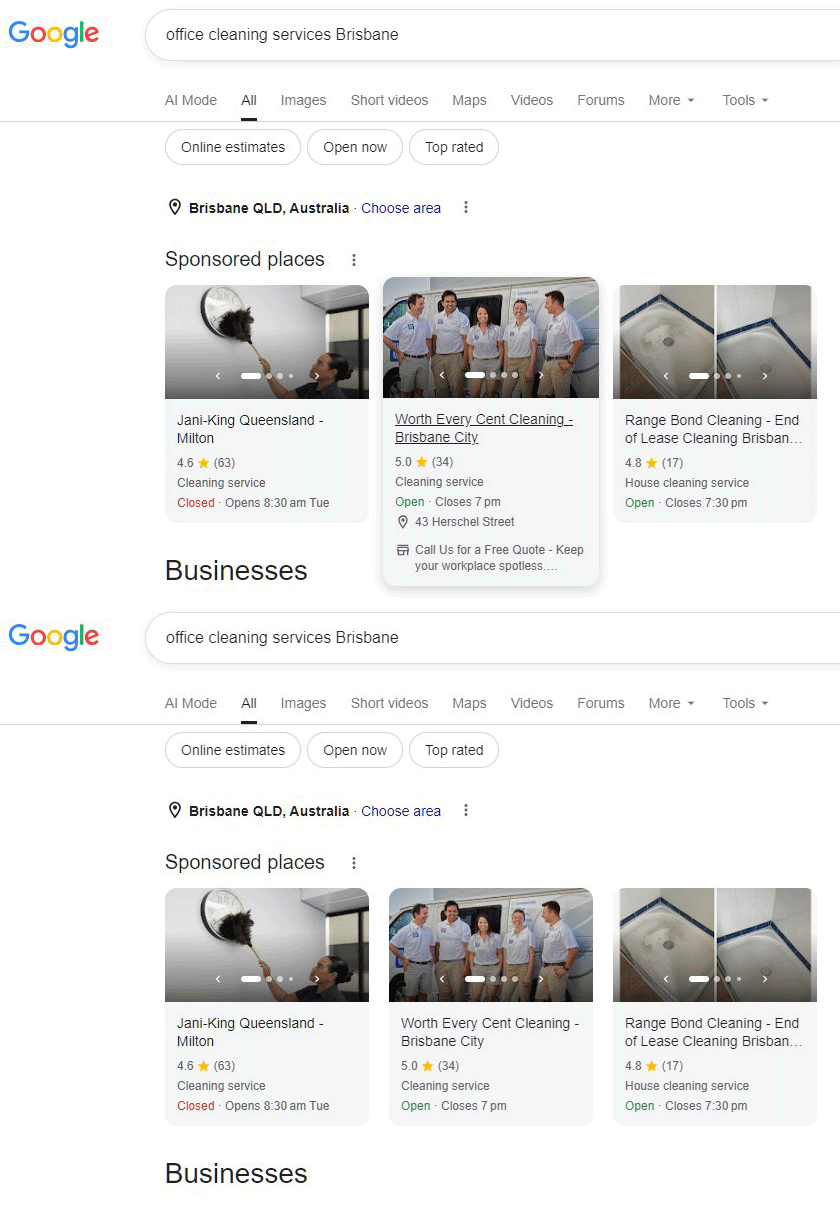
Google’s new hover‑expand feature for Sponsored Places ads lets local businesses display richer content—larger images, extended copy, and a prominent call‑to‑action—directly within search results. Early reports show a 12‑15 % lift in click‑through rates, and the expanded snippet is more AI‑friendly, boosting voice and AI assistant visibility. By updating profiles, refining copy, and tracking conversions, businesses can capture more attention and drive higher foot traffic and online bookings.
Key Highlights
- ✓New hover‑expand feature for Sponsored Places ads
- ✓Higher click‑through rates reported
- ✓Rich content boosts AI visibility
- ✓Easy to implement with existing ads
What Happened
Google is testing a new interactive feature for its Sponsored Places ads. When a user hovers over the ad in Google Search, the unit expands to reveal extra details—a larger image, longer description, and a prominent call‑to‑action button. The effect mirrors the expandable shopping ads launched earlier this year, but it now targets local business listings.
Key Details
- Feature: Hover‑expandable Sponsored Places ad units.
- Where: Appears in the top‑of‑page “Sponsored Places” section on desktop search results.
- Trigger: Mouse hover (or touch‑and‑hold on mobile).
- Content: Adds a second image, more description text, and a prominent “Call Now” or “Book Online” button.
- Testing Status: Currently in limited rollout; visibility varies by query and location.
- Data: Early reports from industry analysts show a 12‑15 % lift in click‑through rate (CTR) for ads that expand.
What It Means For Your Business
1. Higher Visibility – The expanded view makes your ad stand out in a crowded SERP. Users see a richer preview without leaving the search page.
2. Better Engagement – The larger image and extra text give you another opportunity to showcase your unique selling points or promotions.
3. Increased Conversions – With a clear call‑to‑action that appears only when the ad expands, you can drive phone calls, bookings, or website visits more effectively.
4. AI‑Friendly Data – The richer snippet provides more structured information that AI assistants can parse, improving the chances your business shows up in voice or AI‑driven responses.
How to Prepare
- Update Your Business Profile: Ensure your Google Business Profile has high‑quality photos, accurate hours, and up‑to‑date contact info.
- Optimize Ad Copy: Use concise, benefit‑driven language that will display well in the expanded area.
- Use Structured Data: Add schema markup for local business, opening hours, and services so AI tools can harvest the data.
- Track Performance: Set up conversion tracking for calls, appointments, and website visits to measure the impact of the hover expansion.
Quick Tips
- Keep the expanded description under 120 characters for readability.
- Highlight a limited‑time offer or a unique feature to entice the hover action.
- Test different images to see which one drives the highest engagement.
Why It Matters: For local businesses, visibility in AI‑driven search is becoming as important as traditional SERP rankings. The hover‑expand Sponsored Places ad delivers richer, more engaging content that AI assistants can read and present to users. This means your business is more likely to appear in voice responses, AI summaries, and other AI‑generated results, driving traffic and calls. Moreover, the increased CTR and conversion potential directly translate into more leads and sales without extra ad spend. By optimizing for this feature, you ensure your business remains competitive in a landscape where AI tools are the first point of contact for many consumers.
FAQs:
- What is a hover‑expand Sponsored Places ad? It’s a Google Sponsored Places ad that expands to show more images, text, and a call‑to‑action when a user hovers over it on desktop or taps and holds on mobile.
- Does this feature work on mobile devices? Yes, on mobile the ad expands when the user taps and holds the ad, providing the same richer content as on desktop.
- How can I optimize my ad for hover expansion? Use high‑quality images, concise benefit‑driven copy, and include a clear call‑to‑action. Also ensure your Google Business Profile and structured data are up‑to‑date to feed the expanded content.
Why This Matters For Your Business
For local businesses, the hover‑expand Sponsored Places ad offers a direct way to present more detailed information without requiring users to click away from the search results. This richer preview not only boosts click‑through rates by 12‑15 % but also supplies AI assistants with structured data, increasing the likelihood that your business will appear in voice and AI‑driven responses. As consumers increasingly rely on AI tools for local discovery, ensuring your listings are interactive and data‑rich becomes essential for maintaining visibility and driving both online and foot‑traffic conversions.
Frequently Asked Questions
What is a hover‑expand Sponsored Places ad?
It’s a Google Sponsored Places ad that expands to show more images, text, and a call‑to‑action when a user hovers over it on desktop or taps and holds on mobile.
Does this feature work on mobile devices?
Yes, on mobile the ad expands when the user taps and holds the ad, providing the same richer content as on desktop.
How can I optimize my ad for hover expansion?
Use high‑quality images, concise benefit‑driven copy, and include a clear call‑to‑action. Also ensure your Google Business Profile and structured data are up‑to‑date to feed the expanded content.
Is your business showing up in AI search?
Get your free AI visibility audit - see if ChatGPT, Perplexity, and Google AI actually recommend you.