
Home / News / Google Tests Replacing Show More Button On AI Overviews With Loading...
Google Tests Replacing Show More Button On AI Overviews With Loading...
Google has begun testing a change to its AI‑generated overviews, replacing the familiar “Show More” button with a new “Loading…” prompt. The tweak is aimed at streamlining how users expand AI snippets and could shift how businesses appear in search results.
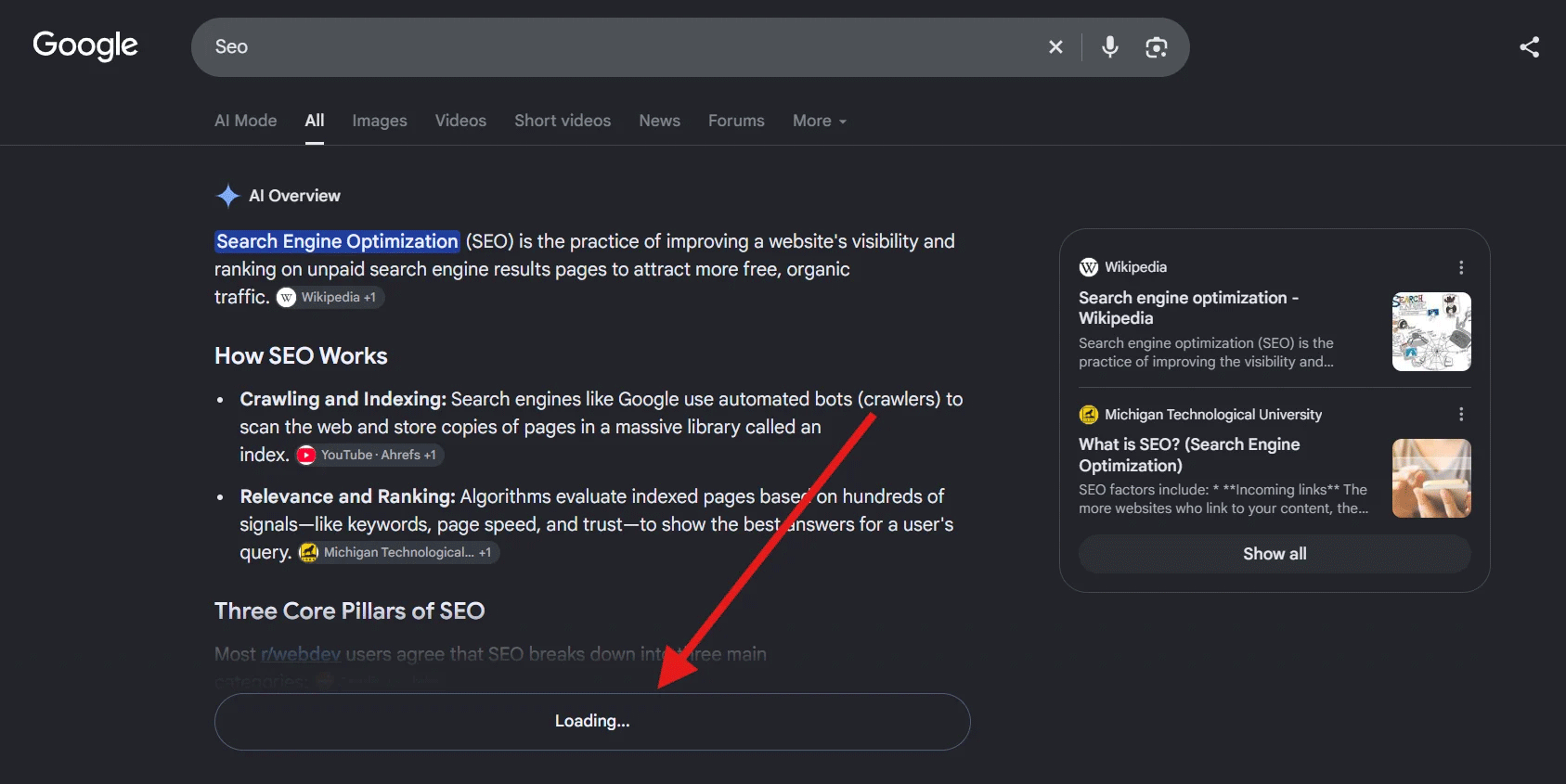
# Google Tests Replacing Show More Button On AI Overviews With Loading...\n\nSep 28, 2026 – 7:21 am\n\nBy [Barry Schwartz](https://www.seroundtable.com/author/barry-schwartz/2.html)\n\nGoogle is currently testing a small but noticeable change to its AI overviews: the familiar “Show More” button has been swapped for a “Loading…” prompt. The tweak appears only on the AI‑generated snippets that surface in the top‑positioned “AI Overview” boxes, and it’s part of Google’s ongoing effort to streamline the way users consume AI‑powered answers.\n\n## What Are AI Overviews?\n\n- AI overviews are concise, AI‑generated summaries that appear at the very top of a search result page for queries that Google deems relevant.\n- They are designed to give users a quick answer, often without the need to click through to a website.\n- The original format included a “Show More” button that let users expand the snippet and read additional details.\n\n## The New Loading Button\n\n- Instead of a static “Show More” link, Google now shows a “Loading…” button that appears after the initial snippet.\n- When a user clicks it, the snippet expands in place, and the button disappears.\n- The change is currently limited to a small percentage of searches and will roll out more broadly if it proves successful.\n\n## Why It Matters for Business Owners\n\n- Visibility shifts: Because the AI overview can now be expanded directly, fewer users may click through to your site for the full answer. This could reduce organic click‑through rates for pages that rely on being the primary answer source.\n- Content strategy: Businesses may need to adjust their content to be more concise or to include a compelling hook within the first few lines, ensuring that the AI overview itself remains relevant to users.\n- Competitive edge: Sites that are already optimized for AI overviews—by structuring content in a question‑answer format or using schema markup—may see a larger share of the expanded view, keeping their brand front‑and‑center.\n\n## Next Steps\n\n- Monitor performance: Track changes in click‑through rate (CTR) and session duration for queries that trigger AI overviews.\n- Optimize for brevity: Craft headlines and first sentences that capture key points quickly.\n- Leverage structured data: Continue using FAQ and How‑To schema to increase the likelihood of being featured in an AI overview.\n\n> “The loading button is a subtle UX tweak, but it can ripple through the way businesses appear in search,” says Barry Schwartz, CEO of RustyBrick.\n\n---\n\n## FAQs\n\nWhat exactly is an AI overview?\nAn AI overview is a short, AI‑generated summary that appears at the top of a search results page, designed to answer user queries instantly.\n\nWill the loading button replace the Show More button for all AI overviews?\nGoogle is currently testing the change on a limited scale. It may be rolled out more widely if the results are positive.\n\nHow can my business adapt to this change?\nFocus on concise, high‑impact content, use structured data, and keep an eye on CTR metrics to see how users interact with AI overviews.\n\nWill this affect my search rankings?\nThe change is primarily a user experience tweak; it shouldn’t directly alter rankings, but lower click‑through rates could indirectly impact your site's authority signals.
Why This Matters For Your Business
For business owners, the new loading button means that the AI overview can now be expanded directly in the search results, potentially reducing the number of clicks that bring users to their website. This shift encourages brands to refine their content to capture attention in the first few lines and to use structured data to stay visible. Monitoring click‑through rates and adjusting content strategy will become essential to maintain visibility in the evolving search landscape.
Frequently Asked Questions
What exactly is an AI overview?
An AI overview is a short, AI‑generated summary that appears at the top of a search results page, designed to answer user queries instantly.
Will the loading button replace the Show More button for all AI overviews?
Google is currently testing the change on a limited scale. It may be rolled out more widely if the results are positive.
How can my business adapt to this change?
Focus on concise, high‑impact content, use structured data, and keep an eye on CTR metrics to see how users interact with AI overviews.
Will this affect my search rankings?
The change is primarily a user experience tweak; it shouldn’t directly alter rankings, but lower click‑through rates could indirectly impact your site's authority signals.
Is your business showing up in AI search?
Get your free AI visibility audit - see if ChatGPT, Perplexity, and Google AI actually recommend you.