
Home / News / Google Tests Two-Row Action Buttons in Mobile Local Panels
Google Tests Two-Row Action Buttons in Mobile Local Panels
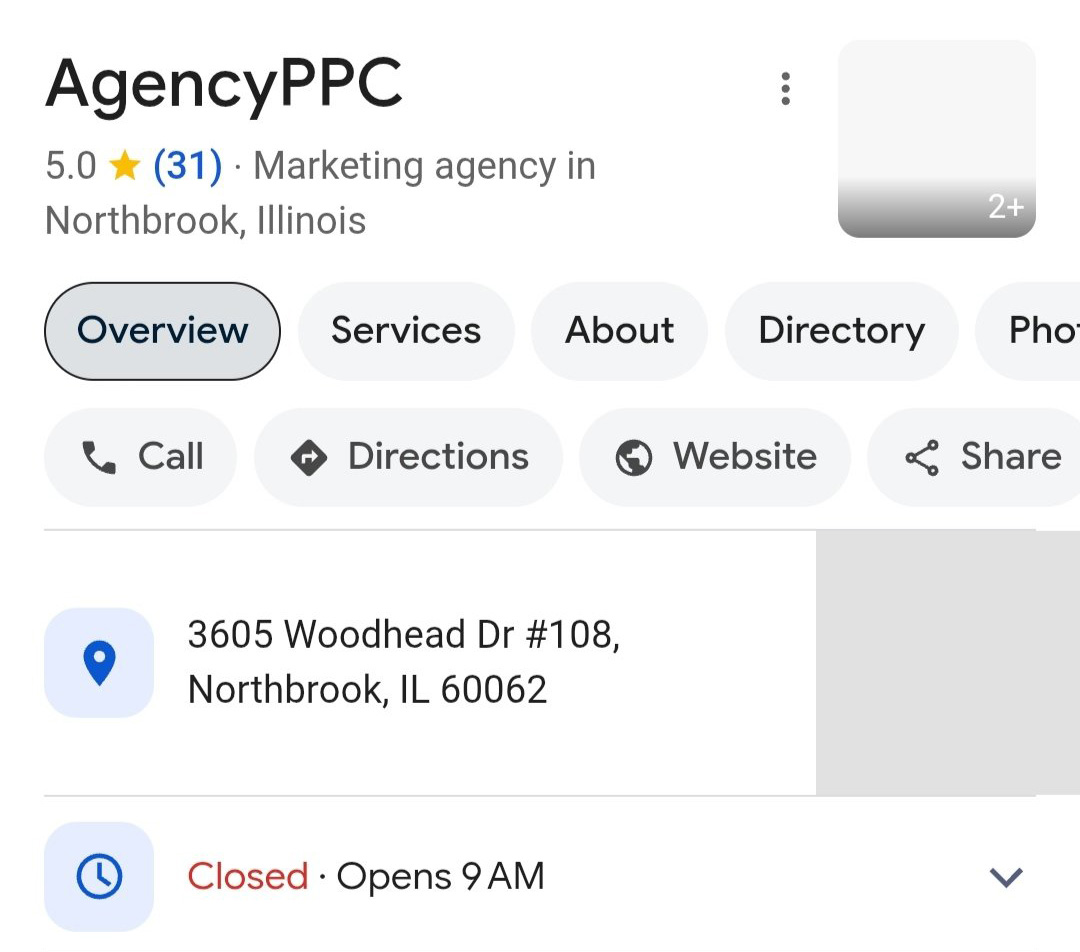
Google is rolling out a new layout for mobile local panels that shows two rows of action buttons, giving users more options at a glance. This change could boost local visibility and click‑through rates for small businesses.
Key Highlights
- ✓Google experiments with two rows of action buttons in mobile local panels.
- ✓New layout can display up to 8 distinct actions (Call, Directions, Book, etc.).
- ✓Early data shows a potential lift in click‑through rates for businesses with more buttons.
- ✓AI tools rely on structured panel data, so richer actions can improve AI search relevance.
What Happened\n\nGoogle has begun testing a new layout for its mobile local panels that features **two rows of action buttons** instead of the single row or + sign it previously used. This change is part of an ongoing effort to make local business information more accessible and actionable directly from the search results.\n\n## Key Details\n\n- **Button types**: Call, Get Directions, Website, Book, Order Online, Reserve, etc.\n- **Layout**: Two rows can show up to 8 distinct actions, giving users more options at a glance.\n- **Implementation**: Currently in an experimental phase, rolled out to a subset of mobile users in certain markets.\n- **Impact on CTR**: Early data suggests that listings with more visible actions see a modest bump in click‑through rates.\n- **Compatibility**: Works across iOS and Android, but the exact appearance may vary by device size.\n\n## What It Means For Your Business\n\n- **Higher visibility for key actions**: If you have a phone number, booking link, or online ordering button, you can now display all of them prominently.\n- **Improved user experience**: Users can choose the most relevant action without scrolling or tapping a + sign, which can reduce friction and increase conversions.\n- **AI‑driven search relevance**: AI tools like ChatGPT, Gemini, and Google AI pull structured data from local panels. A richer set of actions makes your listing more useful to these models, potentially improving citations and the quality of AI responses.\n- **Optimization checklist**:\n - Verify that your Google My Business profile has all relevant attributes (phone, website, booking link, etc.).\n - Keep your information up‑to‑date to avoid missing buttons.\n - Use high‑quality photos and accurate business hours to boost overall panel quality.\n\n- **Potential downsides**: Overloading a panel with too many buttons can clutter the UI. Focus on the most valuable actions for your customers.\n\n- **Next steps for local marketers**:\n - Monitor how the new layout affects your local search traffic.\n - Test adding missing actions to your profile.\n - Keep an eye on Google’s official announcements for broader rollout.\n\nBy embracing the two‑row button design, local businesses can enhance their mobile presence, drive more direct actions from search, and stay ahead in an AI‑centric search landscape.
Why This Matters For Your Business
For local businesses, the way your information appears on mobile search results is more critical than ever. AI‑powered assistants like ChatGPT, Gemini, and Google AI pull from the same local panels that users see in Google Search. With two rows of buttons, each action—call, book, order, or visit—gets a prominent spot, making it easier for AI models to surface the most useful response for a user’s intent.\n\nA richer, more interactive panel also signals to search engines that your business offers a full range of services, which can boost overall ranking quality. As AI search becomes the default way people find local help, a well‑structured profile with visible action buttons can translate directly into higher visibility, more calls, and increased foot traffic.\n\nIn short, the two‑row button experiment isn’t just a UI tweak—it’s an opportunity to make your local presence more actionable and AI‑friendly, giving you a competitive edge in a mobile‑first, AI‑driven world.
Frequently Asked Questions
Will the two‑row button layout be available to all businesses?
Currently it’s in an experimental phase and only rolled out to a subset of mobile users in certain markets. Google will likely expand the rollout gradually.
How can I ensure my business shows up with the new buttons?
Make sure your Google My Business profile is fully updated with phone, website, booking links, and other relevant attributes. Keep your information accurate and add high‑quality photos.
Will the new layout affect my local search rankings?
A richer, more interactive panel can signal higher quality to search engines and improve relevance for AI assistants, potentially boosting your overall local ranking.
Is your business showing up in AI search?
Get your free AI visibility audit - see if ChatGPT, Perplexity, and Google AI actually recommend you.