
Home / News / Google Web Guide Bug: Classic Search Button Fails – Local Biz Impact
Google Web Guide Bug: Classic Search Button Fails – Local Biz Impact
Google’s new Web Guide beta, which blends AI‑driven results with the classic search layout, is currently stuck in a loop. The “Classic search” button redirects to a malformed `null://null` URL, keeping users in the AI view and preventing access to traditional results. Local businesses should act now to safeguard their visibility while Google works on a fix.
Key Highlights
- ✓Google’s Web Guide bug blocks classic search view
- ✓Affects both desktop and mobile users
- ✓Impacts AI assistant visibility for local businesses
- ✓No public fix date yet – act now to stay ahead
Summary: Google’s new Web Guide beta, which blends AI‑driven results with the classic search layout, is currently stuck in a loop. The “Classic search” button redirects to a malformed null://null URL, keeping users in the AI view and preventing access to traditional results. Local businesses should act now to safeguard their visibility while Google works on a fix.
What Happened
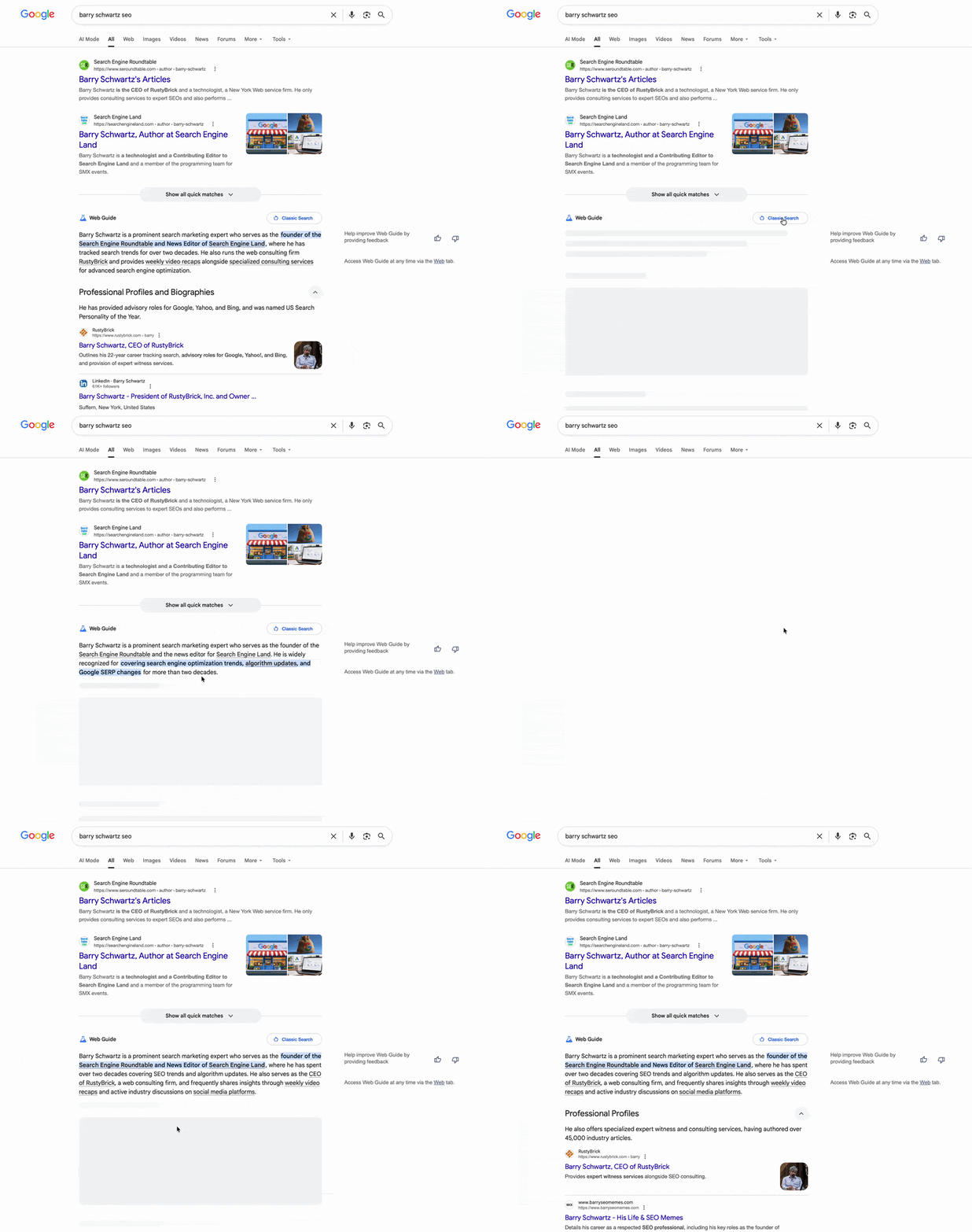
Google introduced Web Guide, a beta feature that layers conversational AI results onto the familiar web‑search interface. The intent was to let users enjoy richer answers while still being able to flip back to a plain list of links. On September 20 2026, a defect surfaced: the “Classic search” button no longer leads to the standard results page. Instead, it reloads the same Web Guide screen, creating a redirect loop.
SEO specialist Damien Andell first reported the issue on X, noting that the button points to a broken null://null URL. Google engineer Glenn Gabe confirmed the problem in a follow‑up tweet, and a GIF shared by Barry Schwartz illustrates the glitch.
Google has acknowledged the bug and is developing a fix, but no public timeline has been announced.
Key Details
- Affected feature: The toggle that switches between the AI‑powered Web Guide view and the classic search list.
- Observed behavior: Clicking “Classic search” simply refreshes the current Web Guide page instead of loading the traditional results.
- Technical cause: The button’s link is malformed (
null://null), which triggers a redirect loop. - Impact scope: Both desktop and mobile browsers running the Web Guide beta experience the issue.
- Google’s response: The company has confirmed the bug and is actively working on a patch.
- Fix timeline: No estimated release date has been provided yet.
What It Means For Your Business
1. Visibility in AI‑Powered Assistants
AI assistants such as ChatGPT, Gemini, and Google AI pull the latest search data to answer user queries. If the classic search view remains inaccessible, those assistants may fail to retrieve or correctly display your business listing, especially for location‑based searches.
2. Customer Experience
More consumers are using voice or conversational search to locate nearby services. A broken “Classic search” button can frustrate shoppers, causing them to skip your business or turn to competitors whose listings load without issue.
3. Citation Consistency
VisibilityAI monitors citations across AI platforms. A malfunction in Google’s interface can create gaps in your citation data, making it harder to confirm that your business is being referenced accurately by AI tools.
4. Competitive Advantage
While Google resolves the glitch, businesses with fully optimized and verified listings will be better positioned to appear once the fix lands. Accurate NAP (Name, Address, Phone) details, up‑to‑date content, and robust schema give AI assistants the signals they need to rank you higher.
Practical Steps to Mitigate the Impact
- Verify your listings: Double‑check that all local directory entries and Google Business Profile information are current.
- Implement structured data: Add JSON‑LD schema to your site so AI assistants can parse your business details directly.
- Monitor performance: Use VisibilityAI’s dashboard to watch for shifts in search visibility and citation counts.
- Stay informed: Follow Google’s official channels and the Search Engine Roundtable for the latest on the bug’s resolution.
- Test regularly: Periodically search for your business in both the classic view and the Web Guide view to confirm that results load as expected.
FAQ
- Q: Will the bug affect all users or only those with the Web Guide beta?
A: The problem is tied to the Web Guide beta, but because the beta is enabled for many users by default, the impact is effectively widespread.
- Q: How can I check if my business is impacted?
A: Search for your business name on Google and see whether the “Classic search” button redirects correctly. VisibilityAI’s citation tracker can also confirm whether your listing is being captured.
- Q: Is there a temporary workaround?
A: Switching browsers or clearing your cache may load the classic view in some cases, but the underlying bug persists until Google releases a fix.
Why This Matters For Your Business
AI‑driven assistants have become the primary gateway for local shoppers seeking nearby services. When Google’s search interface fails to deliver the classic list of results, those assistants lose a reliable source of up‑to‑date business data, which can directly reduce the number of inquiries a small business receives. The glitch also ripples through citation‑tracking tools like VisibilityAI. Missing or outdated citations weaken a business’s authority in conversational queries, potentially lowering its ranking across multiple AI platforms. By staying proactive—verifying listings, adding schema, and monitoring performance—business owners can protect their digital presence until Google restores full functionality.
Frequently Asked Questions
Will the bug affect all users or only those with the Web Guide beta?
The problem is tied to the Web Guide beta, but because the beta is enabled for many users by default, the impact is effectively widespread.
How can I check if my business is impacted?
Search for your business name on Google and see whether the “Classic search” button redirects correctly. VisibilityAI’s citation tracker can also confirm whether your listing is being captured.
Is there a temporary workaround?
Switching browsers or clearing your cache may load the classic view in some cases, but the underlying bug persists until Google releases a fix.
Is your business showing up in AI search?
Get your free AI visibility audit - see if ChatGPT, Perplexity, and Google AI actually recommend you.