
Home / News / WhatsApp Button Now in Google Local Panel – Boost Your Local Visibility
WhatsApp Button Now in Google Local Panel – Boost Your Local Visibility
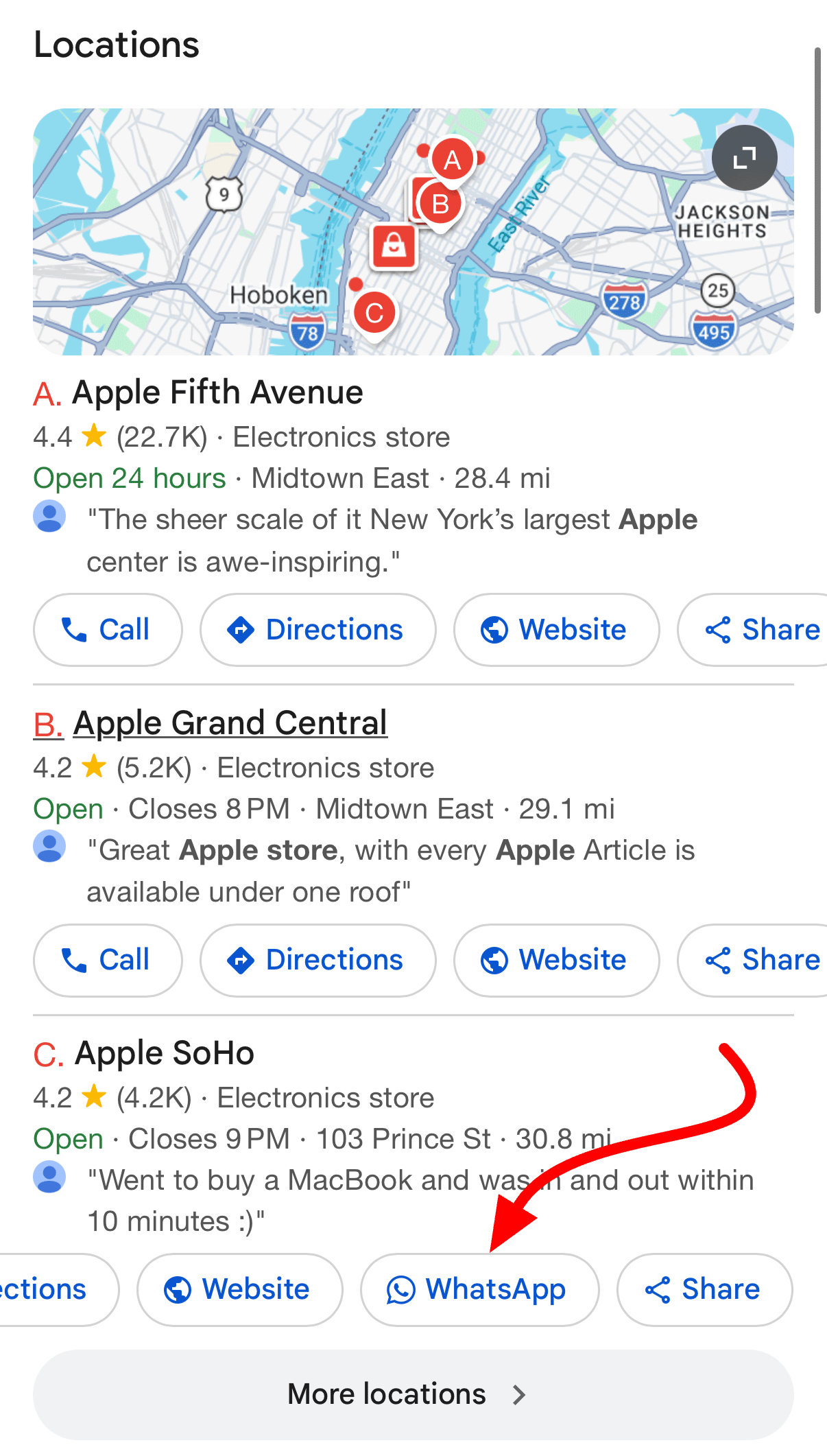
Google has introduced a WhatsApp button to the local panel that appears in search results, allowing shoppers to start a chat with a business directly from the listing. The feature is free for any business that verifies a WhatsApp number in its Google Business Profile and is slated for full rollout in the next few weeks.
Key Highlights
- ✓WhatsApp button now appears in Google Local Panel
- ✓Instant messaging reduces friction for local shoppers
- ✓Free feature—just link your WhatsApp number in Google Business Profile
- ✓Improves AI assistant discoverability and local search rankings
What Happened
Google has just rolled out a new WhatsApp button in the local panel that appears when users search for a nearby business. Positioned alongside the familiar call, directions, website, and share icons, the button lets shoppers open a WhatsApp conversation with the business without leaving the search page.
This addition builds on Google’s earlier option to add a WhatsApp number to a Google Business Profile. Now the button is displayed automatically for listings that meet the eligibility criteria.
Key Details
- Where it appears: The WhatsApp icon shows up in the Google Local Panel on both desktop and mobile search results.
- How it works: Clicking the icon launches a WhatsApp chat window (web or app) pre‑filled with the business’s verified number.
- Eligibility: Only businesses that have verified a WhatsApp number in their Google Business Profile and have enabled the feature in the Google My Business dashboard are shown the button.
- Rollout status: First spotted by SEO specialists and confirmed by multiple reports, the button should be fully deployed across the network within the next few weeks.
- No extra cost: The feature is free; the only requirement is linking a verified WhatsApp number to the profile.
What It Means For Your Business
1. Faster Customer Engagement
- Instant communication: Customers can reach you without navigating away from Google, cutting friction.
- Higher conversion potential: Prompt replies on WhatsApp can move prospects from interest to purchase more quickly.
2. Better AI Discovery
- AI assistants: When tools like ChatGPT, Perplexity, Gemini, or Google AI answer a query about a local store, they can now surface the WhatsApp link as a direct contact method.
- Citation consistency: A verified WhatsApp number adds another authoritative contact point to your business citation profile.
3. Competitive Edge
- Stand out: Not every local business has a WhatsApp button in search results; offering one signals a modern, tech‑savvy operation.
- Local SEO boost: Google tends to favor listings that provide complete contact options, which can translate into higher local rankings.
4. Action Steps
- Verify your WhatsApp number in Google Business Profile.
- Enable the WhatsApp feature in the dashboard settings.
- Test the button by searching for your business name in an incognito window.
- Promote the chat option on your website and social channels.
Why It Matters
For small and local businesses, visibility drives revenue. AI‑driven assistants such as ChatGPT, Perplexity, Gemini, and Google AI pull data from Google listings to answer user queries. A verified WhatsApp number gives those assistants a ready‑to‑use contact method, making it easier for potential customers to reach you.
Beyond convenience, the WhatsApp button signals active customer engagement to search engines. This can improve local‑search signals like click‑through rates and user interaction metrics—factors Google uses to rank local results. In an environment where consumers expect instant communication, offering WhatsApp as a primary channel can differentiate you from competitors still relying solely on phone calls or email.
The integration also streamlines your marketing stack. Instead of juggling multiple messaging apps, you can funnel local inquiries through WhatsApp, where you can automate replies, track conversations, and collect feedback—all while keeping your Google listing clean and authoritative.
FAQs
- Q1: Do I need to pay for the WhatsApp button?
A1: No. The button is free once your WhatsApp number is verified in your Google Business Profile.
- Q2: Will the button appear for all businesses?
A2: It appears only for listings that have linked a WhatsApp number and have the feature turned on. Not every business is eligible yet.
- Q3: How do I verify my WhatsApp number?
A3: In Google Business Profile, go to Info → Phone → Add WhatsApp number and follow the on‑screen verification steps.
Takeaway
The addition of a WhatsApp button to Google’s local panel is a game‑changer for local businesses. It speeds up customer engagement, improves AI discoverability, and can give you a measurable edge in local search. Keep your profile up‑to‑date, link your WhatsApp number, and start chatting with customers directly from search results today.
Why This Matters For Your Business
AI assistants such as ChatGPT, Perplexity, Gemini, and Google AI rely on Google’s listings to answer local queries. When a business includes a verified WhatsApp number, the assistant can present that instant‑messaging link as a direct way to contact the store, reducing the steps a user must take and increasing the likelihood of a conversion. Moreover, the presence of a WhatsApp button signals to Google that the business is actively engaging with customers. This engagement can boost key local‑search metrics—click‑through rates, dwell time, and interaction counts—that influence rankings. In a market where consumers expect real‑time responses, offering WhatsApp as a first‑line channel helps businesses stand out from competitors still limited to phone calls or email.
Frequently Asked Questions
Do I need to pay for the WhatsApp button?
No. The button is free once your WhatsApp number is verified in your Google Business Profile.
Will the button appear for all businesses?
It appears only for listings that have linked a WhatsApp number and have the feature turned on. Not every business is eligible yet.
How do I verify my WhatsApp number?
In Google Business Profile, go to **Info → Phone → Add WhatsApp number** and follow the on‑screen verification steps.
Is your business showing up in AI search?
Get your free AI visibility audit - see if ChatGPT, Perplexity, and Google AI actually recommend you.